How to Create a Custom PDF Viewer Service in Vue PDF Viewer
14 Aug 202619 minutes to read
The Vue PDF Viewer relies on a server-side service to process PDF documents for rendering. This section explains how to create an ASP.NET MVC Web API service to perform server-side preprocessing for the client.
Prerequisites
To get started with an ASP.NET MVC Web API service, ensure the following software is installed:
- .NET Framework 4.5 or later
- ASP.NET MVC 4 or ASP.NET MVC 5
- Web API
- Visual Studio
Set up an ASP.NET MVC application with Web API for the PDF Viewer service
Follow these steps to create the PDF Viewer service
Step 1: Create an ASP.NET Web Application using the default template in Visual Studio 2017.
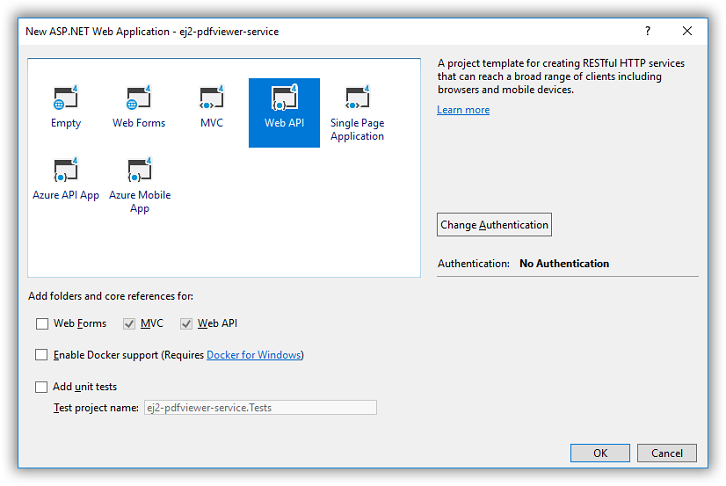
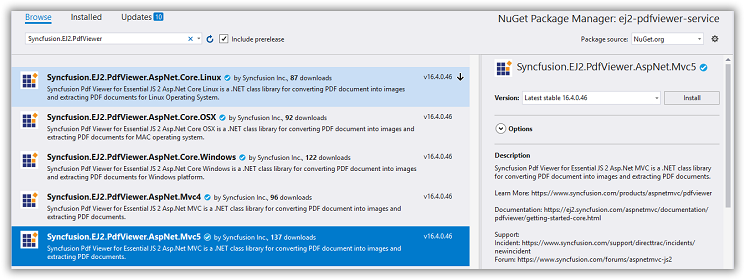
Step 2: After creating the project, add the Syncfusion.EJ2.PdfViewer.AspNet.MVC5 dependency using NuGet Package Manager.
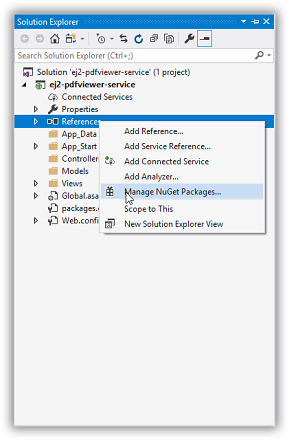
Open the NuGet package manager.
Install the Syncfusion.EJ2.PdfViewer.AspNet.Mvc5 package for the application.
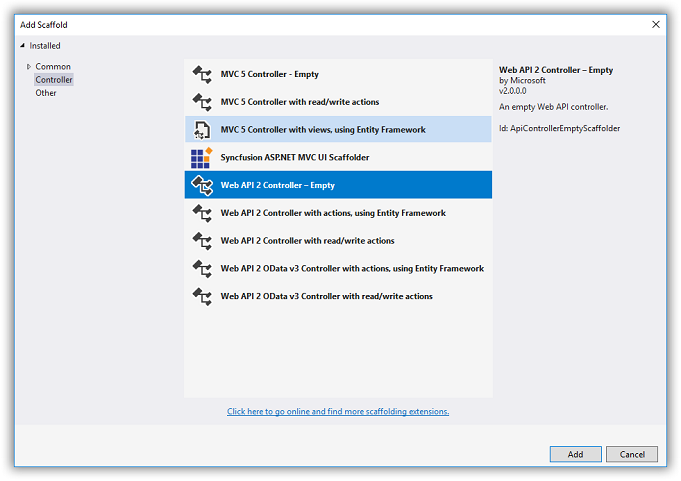
Step 3: Add a Web API 2 controller to the project and name it PdfViewerController.
Step 4: Add the following code to PdfViewerController.cs.
using Newtonsoft.Json;
using Syncfusion.EJ2.PdfViewer;
using System;
using System.Collections.Generic;
using System.IO;
using System.Linq;
using System.Net;
using System.Net.Http;
using System.Web;
using System.Web.Http;

namespace MvcWebService.webapi
{
    public class PdfViewerController : ApiController
    {
        [System.Web.Mvc.HttpPost]
        public object Load(Dictionary<string, string> jsonObject)
        {
            PdfRenderer pdfviewer = new PdfRenderer();
            MemoryStream stream = new MemoryStream();
            object jsonResult = new object();
   if (jsonObject != null && jsonObject.ContainsKey("document"))
            {
                if (bool.Parse(jsonObject["isFileName"]))
                {
                    string documentPath = GetDocumentPath(jsonObject["document"]);
                    if (!string.IsNullOrEmpty(documentPath))
                    {
                        byte[] bytes = System.IO.File.ReadAllBytes(documentPath);
                        stream = new MemoryStream(bytes);
                    }
                    else
                    {
                        string fileName = jsonObject["document"].Split(new string[] { "://" }, StringSplitOptions.None)[0];

                        if (fileName == "http" || fileName == "https")
                        {
                            WebClient WebClient = new WebClient();
                            byte[] pdfDoc = WebClient.DownloadData(jsonObject["document"]);
                            stream = new MemoryStream(pdfDoc);
                        }

                        else
                        {
                            return (jsonObject["document"] + " is not found");
                        }
                    }
                }
                else
                {
                    byte[] bytes = Convert.FromBase64String(jsonObject["document"]);
                    stream = new MemoryStream(bytes);
                }
            }
            jsonResult = pdfviewer.Load(stream, jsonObject);
            return (JsonConvert.SerializeObject(jsonResult));
        }
        [System.Web.Mvc.HttpPost]
        public object Bookmarks(Dictionary<string, string> jsonObject)
        {
            PdfRenderer pdfviewer = new PdfRenderer();
            var jsonResult = pdfviewer.GetBookmarks(jsonObject);
            return (jsonResult);
        }
        [System.Web.Mvc.HttpPost]
        public object RenderPdfPages(Dictionary<string, string> jsonObject)
        {
            PdfRenderer pdfviewer = new PdfRenderer();
            object jsonResult = pdfviewer.GetPage(jsonObject);
            return (JsonConvert.SerializeObject(jsonResult));
        }
        [System.Web.Mvc.HttpPost]
        public object RenderThumbnailImages(Dictionary<string, string> jsonObject)
        {
            PdfRenderer pdfviewer = new PdfRenderer();
            object result = pdfviewer.GetThumbnailImages(jsonObject);
            return (JsonConvert.SerializeObject(result));
        }
        [System.Web.Mvc.HttpPost]
        public object RenderPdfTexts(Dictionary<string, string> jsonObject)
        {
            PdfRenderer pdfviewer = new PdfRenderer();
            object result = pdfviewer.GetDocumentText(jsonObject);
            return (JsonConvert.SerializeObject(result));
        }


        [System.Web.Mvc.HttpPost]
        public object RenderAnnotationComments(Dictionary<string, string> jsonObject)
        {
            PdfRenderer pdfviewer = new PdfRenderer();
            object jsonResult = pdfviewer.GetAnnotationComments(jsonObject);
            return (JsonConvert.SerializeObject(jsonResult));
        }
        [System.Web.Mvc.HttpPost]
        public object Unload(Dictionary<string, string> jsonObject)
        {
            PdfRenderer pdfviewer = new PdfRenderer();
            pdfviewer.ClearCache(jsonObject);
            return ("Document cache is cleared");
        }
        [System.Web.Mvc.HttpPost]
        public HttpResponseMessage Download(Dictionary<string, string> jsonObject)
        {

            PdfRenderer pdfviewer = new PdfRenderer();
            string documentBase = pdfviewer.GetDocumentAsBase64(jsonObject);
            return (GetPlainText(documentBase));
        }

        [System.Web.Mvc.HttpPost]
        public object PrintImages(Dictionary<string, string> jsonObject)
        {
            PdfRenderer pdfviewer = new PdfRenderer();
            object pageImage = pdfviewer.GetPrintImage(jsonObject);
            return (pageImage);
        }
        private HttpResponseMessage GetPlainText(string pageImage)
        {
            var responseText = new HttpResponseMessage(HttpStatusCode.OK);
            responseText.Content = new StringContent(pageImage, System.Text.Encoding.UTF8, "text/plain");
            return responseText;
        }
        private string GetDocumentPath(string document)
        {
            string documentPath = string.Empty;
            if (!System.IO.File.Exists(document))
            {
                var path = HttpContext.Current.Request.PhysicalApplicationPath;
                if (System.IO.File.Exists(path + "/Data/" + document))
                    documentPath = path + "/Data/" + document;
            }
            else
            {
                documentPath = document;
            }
            return documentPath;
        }

        // GET api/values
        [System.Web.Mvc.HttpPost]
        public IEnumerable<string> Get()
        {
            return new string[] { "value1", "value2" };
        }

        [System.Web.Mvc.HttpPost]
        //Post action to export annotations
        [System.Web.Mvc.Route("{id}/ExportAnnotations")]

        public HttpResponseMessage ExportAnnotations(Dictionary<string, string> jsonObject)
        {
            PdfRenderer pdfviewer = new PdfRenderer();
            string jsonResult = pdfviewer.ExportAnnotation(jsonObject);
            return (GetPlainText(jsonResult));
        }

        [System.Web.Mvc.HttpPost]
        //Post action to import annotations
        public object ImportAnnotations(Dictionary<string, string> jsonObject)
        {
            PdfRenderer pdfviewer = new PdfRenderer();
            string jsonResult = string.Empty;
            object JsonResult;
            if (jsonObject != null && jsonObject.ContainsKey("fileName"))
            {
                string documentPath = GetDocumentPath(jsonObject["fileName"]);
                if (!string.IsNullOrEmpty(documentPath))
                {
                    jsonResult = System.IO.File.ReadAllText(documentPath);
                }
                else
                {
                    return (jsonObject["document"] + " is not found");
                }
            }
            else
            {
                string extension = Path.GetExtension(jsonObject["importedData"]);
                if (extension != ".xfdf")
                {
                    JsonResult = pdfviewer.ImportAnnotation(jsonObject);
                    return (GetPlainText((JsonConvert.SerializeObject(JsonResult))));
                }
                else
                {
                    string documentPath = GetDocumentPath(jsonObject["importedData"]);
                    if (!string.IsNullOrEmpty(documentPath))
                    {
                        byte[] bytes = System.IO.File.ReadAllBytes(documentPath);
                        jsonObject["importedData"] = Convert.ToBase64String(bytes);
                        JsonResult = pdfviewer.ImportAnnotation(jsonObject);
                        return (GetPlainText((JsonConvert.SerializeObject(JsonResult))));
                    }
                    else
                    {
                        return (jsonObject["document"] + " is not found");
                    }
                }
            }
            return (GetPlainText((jsonResult)));
        }

    }
}
Step 5: Configure the CORS policy in the web.config file.
 <system.webServer>
    <httpProtocol>
      <customHeaders>
        <add name="Access-Control-Allow-Headers" value="accept, maxdataserviceversion, origin, x-requested-with, dataserviceversion,content-type" />
        <add name="Access-Control-Allow-Origin" value="*" />
        <add name="Access-Control-Max-Age" value="1728000" />
      </customHeaders>
    </httpProtocol>
  </system.webServer>
Step 6: Set global configuration in Global.asax:
    System.Web.Http.GlobalConfiguration.Configuration.Routes.MapHttpRoute(
    name: "DefaultApi",
    routeTemplate: "api/{controller}/{action}/{id}",
    defaults: new { id = RouteParameter.Optional });
    AppDomain.CurrentDomain.SetData("SQLServerCompactEditionUnderWebHosting", true);
Download the sample to create a PDF Viewer web service: https://www.syncfusion.com/downloads/support/directtrac/general/ze/MvcWebService587924662.zip
Conclusion
These steps show how to create an ASP.NET MVC web service that hosts the Syncfusion PDF Viewer back end, configure CORS, and connect it to the Vue PDF Viewer component for server-side rendering, text extraction, thumbnails, and annotation operations.