Localization in .NET MAUI PDF Viewer
14 Aug 20265 minutes to read
Localization is the process of translating the application resources into a different language for specific cultures. SfPdfViewer is set up by default with the language code en-US. However, by including a resource file (.resx) in the application with the language code, the static text used in the SfPdfViewer can be localized to a different language.
Follow the instructions given to apply localization to the SfPdfViewer.
Change the current user interface culture
Set the CurrentUICulture property in the App.xaml.cs file to the desired user interface culture. Refer to the following code sample to change the current culture to French.
using System.Globalization;

namespace PdfViewerLocalization;

public partial class App : Application
{
	public App()
	{
		InitializeComponent();
        CultureInfo.CurrentUICulture = new CultureInfo("fr-FR");
        MainPage = new AppShell();
	}
}
Create and add the resource file to the application
Follow the given steps to create and add the resource file to the application.
-
Right-click on the
Resourcesfolder in the application.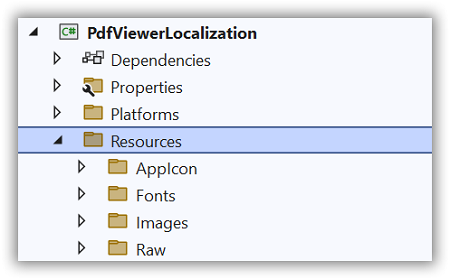
-
Click the
Addoption and then selectNewItem.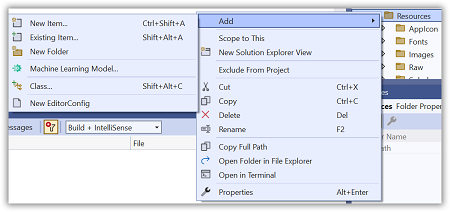
-
In the
Add New Itemwizard, select theResource Fileoption and name the file in the format<control name>.<culture name>.resx. For example, name the file as SfPdfViewer.fr.resx forFrenchculture.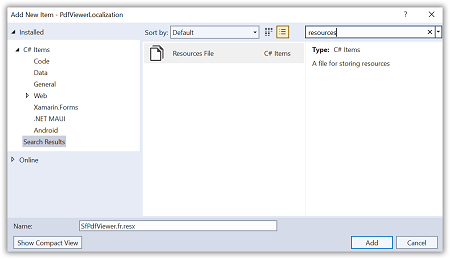
-
Click the
Addoption to add the resource file in the Resources folder. -
Change the
Build Actionof the resource file toEmbedded resource.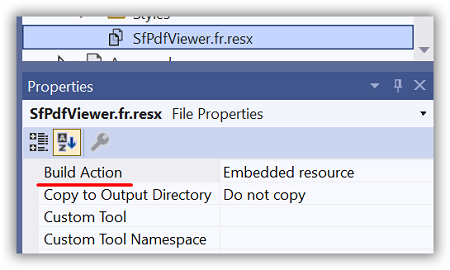
-
Double tap on the resource file to add the name and value details to the Resource Designer.
-
Set the
ResourceManageras shown in the following code example, that looks up the resource file with the specified root name.
using System.Resources;
using System.Globalization;
using Syncfusion.Maui.PdfViewer;

namespace PdfViewerLocalization;

public partial class App : Application
{
	public App()
	{
		InitializeComponent();
        CultureInfo.CurrentUICulture = new CultureInfo("fr-FR");
        SfPdfViewerResources.ResourceManager = new ResourceManager("PdfViewerLocalization.Resources.SfPdfViewer",
			Application.Current.GetType().Assembly);
        MainPage = new AppShell();
	}
}
When localizing multiple Syncfusion MAUI controls in a .NET MAUI application, it’s important to understand that these controls support only a single ResourceManager instance for localization. If you assign different ResourceManager instances for separate resource (.resx) files, the last assigned ResourceManager will override the others. This can result in incomplete or incorrect localization across your controls. To ensure consistent and accurate localization, consolidate all localization keys (name-value pairs) into a single resource (.resx) file and assign the ResourceManager using that unified resource file, as shown below:
using Syncfusion.Maui.Core.Localization;

// Assign the ResourceManager using the unified .resx file
LocalizationResourceAccessor.ResourceManager = new ResourceManager("Localization.Resources.SyncfusionControls", Application.Current.GetType().Assembly);
// Replace the above string with your resource file's actual namespace and name.
Default names and values
The following table contains the default name and value details used in the SfPdfViewer in the en-US
| Name | Value |
|---|---|
| Add Signature | Add Signature |
| AddBookmark | Add bookmark |
| AddFreeTextToastMessage | Tap on the page to add the free text annotation |
| AddHighlightToastMessage | Drag over a text to highlight it |
| AddReply | Add Reply |
| AddSignature | Add signature |
| AddSignatureToastMessage | Tap to add the signature |
| AddSquigglyToastMessage | Drag over a text to add a squiggly underline |
| AddStampToastMessage | Tap to add the stamp |
| AddStickyNoteToastMessage | Tap to add a sticky note |
| AddStrikeoutToastMessage | Drag over a text to strike it through |
| AddUnderlineToastMessage | Drag over a text to underline it |
| AddYourComment | Add a comment... |
| Annotations | Annotations |
| AnnotationSeparator | Annotation Separator |
| Apply | Apply |
| ApplyRedactionsConfirmation | You are about to permanently remove all content that has been marked for redaction. Once the document is saved, this operation cannot be undone. Are you sure you want to continue? |
| Arrow | Arrow |
| Back | Back |
| BackIconSeparator | Back Icon Separator |
| Bookmarks | Bookmarks |
| Border | Border |
| BorderStyle | Border Style |
| Cancel | Cancel |
| CanOpenWebPage | Do you want to open |
| Circle | Circle |
| Clear | Clear |
| Close | CLOSE |
| Cloud | Cloud |
| Color | Color |
| ColorPicker | Color picker |
| ColorPickerSeparator | Color Picker Separator |
| Comment | Comment |
| Comments | Comments |
| ContinuousPage | Continuous page |
| Copy | Copy |
| Create | Create |
| CreateSignature | Create Signature |
| CreateStamps | Create Stamps |
| CurrentPage | Current page |
| CustomStamps | Custom Stamps |
| CustomText | Custom text |
| Delete | Delete |
| DeleteSeparator | Delete Separator |
| DocumentLoadFailed | Failed to load the PDF document. |
| Drag and drop an image here | Drag and drop an image here |
| DragAndDropImage | Drag and drop an image here. |
| Draw | Draw |
| Draw your signature | Draw your signature |
| DrawArrowToastMessage | Drag to draw an arrow |
| DrawCircleToastMessage | Drag to draw a circle |
| DrawCloudToastMessage | Tap to begin drawing a cloud |
| DrawInkToastMessage | Drag to draw an ink |
| DrawLineToastMessage | Drag to draw a line |
| DrawPolygonToastMessage | Tap to begin drawing a polygon |
| DrawPolylineToastMessage | Tap to begin drawing a polyline |
| DrawSquareToastMessage | Drag to draw a square |
| Edit | Edit |
| EditYourComment | Edit a comment... |
| Enter | Enter |
| EnterPassword | Enter Password |
| EraseInkToastMessage | Drag over an ink to erase it |
| Error | Error |
| EvenPagesOnly | Even pages only |
| Fill | Fill |
| FillColor | Fill color |
| FillOpacity | Fill opacity |
| FitToPage | Fit to Page |
| FitToWidth | Fit to Width |
| Font | Font |
| FontColor | Font color |
| FontSize | Font size |
| FreeText | Free text |
| FreeTextEditorPlaceHolder | Text… |
| GoToPage | Go to Page |
| GuestUser | Guest User |
| Help | Help |
| Highlight | Highlight |
| Ink | Ink |
| InkEraser | Ink eraser |
| Insert | Insert |
| InvalidPageNumber | Invalid page number |
| InvalidPasswordError | Can't open an encrypted document. The password is invalid. |
| Key | Key |
| Line | Line |
| MarkForRedaction | Mark for Redaction |
| MarkPageRange | Mark page range |
| MatchCase | Match Case |
| MoreItems | More items |
| MoreOptionSeparator | More Option Separator |
| NewParagraph | New Paragraph |
| NextPage | Next page |
| NoBookmark | No Bookmark |
| NoBookmarks | No Bookmarks |
| NoColor | No Color |
| NoComments | No Comments available |
| NoMatchesWereFoundToastMessage | No matches were found. |
| NoMoreMatchesWereFoundToastMessage | No more matches were found |
| NoOutline | No outline |
| Note | Note |
| OddPagesOnly | Odd pages only |
| of | of |
| Ok | OK |
| Opacity | Opacity |
| Open | OPEN |
| OpenWebPage | Open Web Page |
| Outline | Outline |
| OutlineColor | Outline color |
| Page | Page |
| PageByPage | Page by page |
| PageCount | Page count |
| PageCountSeparator | Page Count Separator |
| PageLayoutMode | Page layout mode |
| PageNumberEntry | Page number entry |
| PageNumberHint | Enter page number here |
| PageRange | Page range |
| Paragraph | Paragraph |
| PasswordErrorHint | Check your password |
| Polygon | Polygon |
| Polyline | Polyline |
| PreviousPage | Previous page |
| PrintSeparator | Print Separator |
| Properties | Properties |
| RedactArea | Redact area |
| RedactedAreaFillColor | Redacted area fill color |
| Redaction | Redaction |
| RedactionMarkAppearance | Redaction mark appearance |
| RedactionProperties | Redaction properties |
| RedactionSeparator | Redaction Separator |
| RedactPages | Redact pages |
| RedactText | Redact text |
| Redo | Redo |
| Rename | Rename |
| RepeatOverlayText | Repeat overlay text |
| Replies | Replies |
| Reply | Reply |
| RequestPassword | This PDF file is protected. Please enter the password to open it. |
| Save | Save |
| SaveSignature | Save Signature |
| Search | Search |
| SearchPlaceholder | Find in the document |
| Shapes | Shapes |
| Signature | Signature |
| SpecificPage | Specific page |
| Square | Square |
| Squiggly | Squiggly |
| Stamps | Stamps |
| StandardStamps | Standard Stamps |
| StickyNote | Sticky note |
| StickyNoteEditorPlaceholder | Write Your Note… |
| StickyNoteIcons | Sticky note icons |
| Strikeout | Strikeout |
| Stroke | Stroke |
| Text | Text |
| TextColor | Text color |
| TextFillColor | Text fill color |
| TextMarkups | Text markups |
| TextPropertySeparator | Text Property Separator |
| Thickness | Thickness |
| Type | Type |
| Type your signature | Type your signature |
| TypeSignaturePlaceHolder | Type your signature |
| Underline | Underline |
| Undo | Undo |
| Upload | Upload |
| Upload an image | Upload an image |
| UploadImage | Upload an image |
| UseOverlayText | Use overlay text |
| Warning | Warning |
| XFAFormNotSupportedMessage | This PDF cannot be loaded because it contains an XFA form. |
| ZoomIconSeparator | Zoom Icon Separator |
| ZoomMode | Zoom mode |