Highlight Differences in TypeScript PDF Viewer UI
1 Oct 20265 minutes to read
The semantic text comparison feature highlights differences between two PDF documents with customizable colors and opacity, making it easy to identify changes at a glance.
Overview
When you compare two PDF documents using the semantic text comparison feature, differences are highlighted with:
- Deleted text - Highlighted in one color (default: red)
- Added text - Highlighted in another color (default: green)
- Synchronized viewers - Both documents remain aligned during comparison
Prerequisites
- Syncfusion TypeScript PDF Viewer installed
-
PdfComparerclass available - Two PDF documents ready for comparison
Steps
Step 1: Import required components
import { PdfComparer } from '@syncfusion/ej2-pdfviewer';Step 2: Create the semantic text comparison component
Set up the comparison with basic default highlighting:
let pdfComparers: PdfComparer = new PdfComparer();

pdfComparers.originalDocumentPath = 'https://cdn.syncfusion.com/content/pdf/original-document.pdf';
pdfComparers.modifiedDocumentPath = 'https://cdn.syncfusion.com/content/pdf/modified-document.pdf';

pdfComparers.resourceUrl = 'https://cdn.syncfusion.com/ej2/31.2.2/dist/ej2-pdfviewer-lib';

pdfComparers.appendTo('#PdfViewer');
Step 3: Configure highlight colors and options
Define the comparison options to customize highlighting:
interface ComparisonOptions {
    beforeColor: string;
    afterColor: string;
    beforeColorOpacity: number;
    afterColorOpacity: number;
    enableHighlights: boolean;
}

const comparisonOptions: ComparisonOptions = {
    beforeColor: '#FF0000',        // Color for deleted text (red)
    afterColor: '#00FF00',         // Color for added text (green)
    beforeColorOpacity: 0.4,       // Transparency for deleted (0-1)
    afterColorOpacity: 0.4,        // Transparency for added (0-1)
    enableHighlights: true         // Enable visual highlighting
};

let pdfComparers: PdfComparer = new PdfComparer();

pdfComparers.originalDocumentPath = 'https://cdn.syncfusion.com/content/pdf/original-document.pdf';
pdfComparers.modifiedDocumentPath = 'https://cdn.syncfusion.com/content/pdf/modified-document.pdf';
pdfComparers.comparisonOptions = comparisonOptions;

pdfComparers.resourceUrl = 'https://cdn.syncfusion.com/ej2/31.2.2/dist/ej2-pdfviewer-lib';

pdfComparers.appendTo('#PdfViewer');
Highlight customization
Comparison options
The highlight appearance is controlled by these options in the comparisonOptions object:
| Option | Type | Description | Default |
|---|---|---|---|
beforeColor |
string | Color for deleted text (hex format) | #FF0000 |
afterColor |
string | Color for added text (hex format) | #00FF00 |
beforeColorOpacity |
number | Transparency for deleted (0-1) | 0.4 |
afterColorOpacity |
number | Transparency for added (0-1) | 0.4 |
enableHighlights |
boolean | Enable/disable visual highlighting | true |
Viewer behavior properties
Control the viewer behavior with these properties:
| Property | Type | Description | Default |
|---|---|---|---|
enableDifferencePanel |
boolean | Show/hide sidebar panel displaying detected differences | true |
enableSyncScrolling |
boolean | Enable synchronized scrolling, navigation, and magnification between viewers | true |
Control the difference panel
Use the enableDifferencePanel property to show or hide the sidebar panel that displays all detected differences:
let pdfComparers: PdfComparer = new PdfComparer();

pdfComparers.originalDocumentPath = 'https://cdn.syncfusion.com/content/pdf/original-document.pdf';
pdfComparers.modifiedDocumentPath = 'https://cdn.syncfusion.com/content/pdf/modified-document.pdf';
pdfComparers.enableDifferencePanel = false;    // Hide the differences sidebar panel

pdfComparers.resourceUrl = 'https://cdn.syncfusion.com/ej2/31.2.2/dist/ej2-pdfviewer-lib';

pdfComparers.appendTo('#PdfViewer');
Control synchronized scrolling and navigation
Use the enableSyncScrolling property to control whether the viewers stay synchronized during scrolling, page navigation, and magnification (zoom):
let pdfComparers: PdfComparer = new PdfComparer();

pdfComparers.originalDocumentPath = 'https://cdn.syncfusion.com/content/pdf/original-document.pdf';
pdfComparers.modifiedDocumentPath = 'https://cdn.syncfusion.com/content/pdf/modified-document.pdf';
pdfComparers.enableSyncScrolling = false;      // Disable synchronized scrolling and navigation

pdfComparers.resourceUrl = 'https://cdn.syncfusion.com/ej2/31.2.2/dist/ej2-pdfviewer-lib';

pdfComparers.appendTo('#PdfViewer');
Features
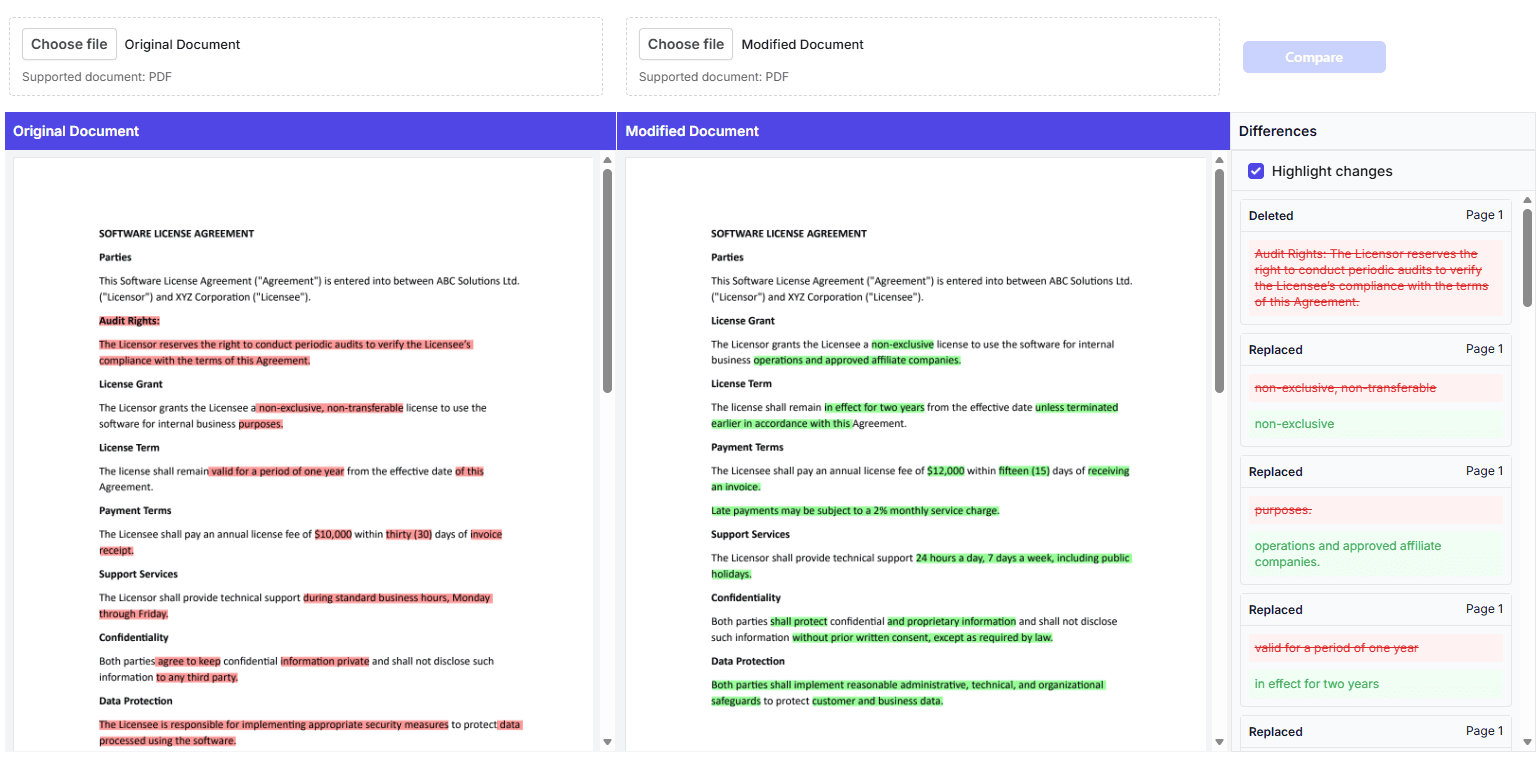
- Side-by-side viewers - Compare original and modified documents simultaneously
- Synchronized navigation - Zoom, scroll, and page navigation synchronized between viewers
- Color-coded highlighting - Visual differentiation of added and deleted text (red for deleted, green for added)
- Differences panel - Consolidated list on the right showing all detected differences categorized by type
- File upload support - Upload custom PDFs for comparison