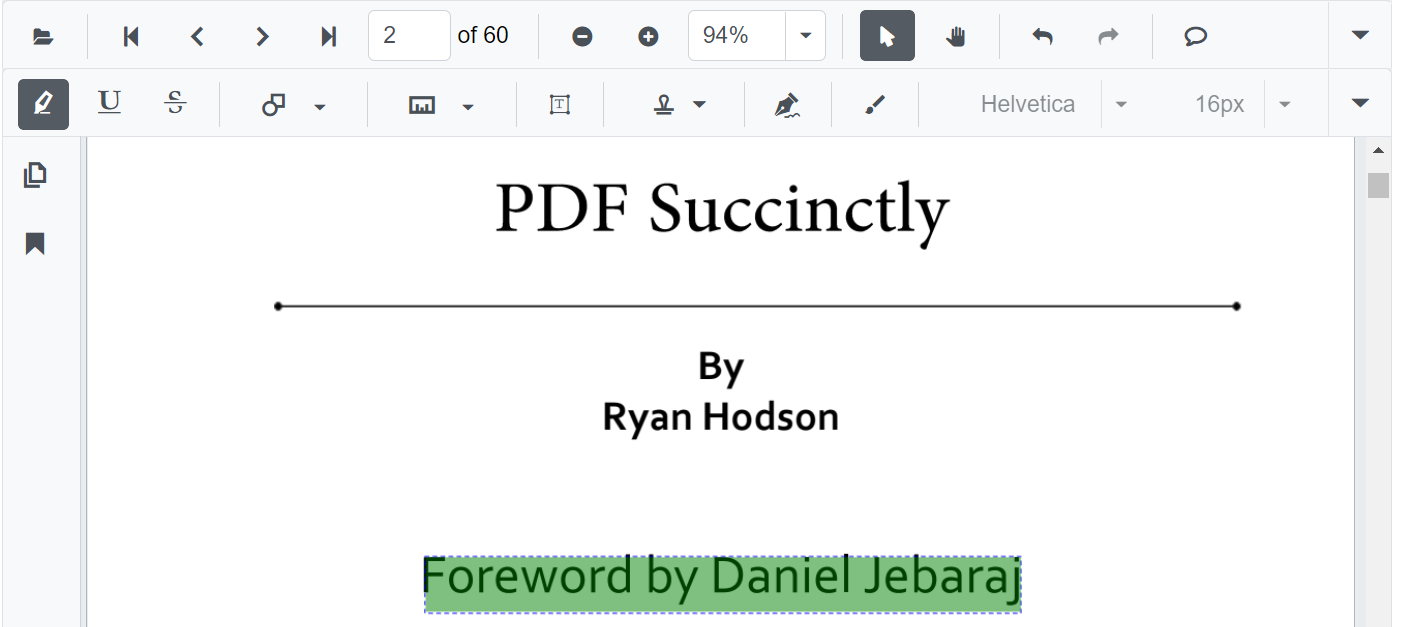
How to Change text highlight color in Blazor PDF Viewer
14 Aug 20261 minute to read
You can change the highlight color of the selected annotation using the Color property of the PdfViewerHighlightSettings class.
The following code illustrates how to change the highlight color of the text.
@using Syncfusion.Blazor.Buttons
@using Syncfusion.Blazor.PdfViewer

<!--Render simple PDF Viewer with customized highlight options-->
<SfPdfViewer @ref="PDFViewer"
             DocumentPath="@DocumentPath"
             ServiceUrl="https://ej2services.syncfusion.com/production/web-services/api/pdfviewer">
    <PdfViewerHighlightSettings Color="@highlightColor"></PdfViewerHighlightSettings>
</SfPdfViewer>

@code{
    SfPdfViewer PDFViewer;

    //Sets the PDF document path for initial loading.
    private string DocumentPath { get; set; } = "PDF_Succinctly.pdf";

    //Defines the color for text markup annotations like highlight.
    private string highlightColor = "Green";

}