Stamp Annotation in ASP.NET MVC PDF Viewer
25 Sep 202620 minutes to read
The PDF Viewer control provides options to add, edit, delete, and rotate the following stamp annotations in PDF documents:
- Dynamic
- Sign Here
- Standard Business
- Custom Stamp
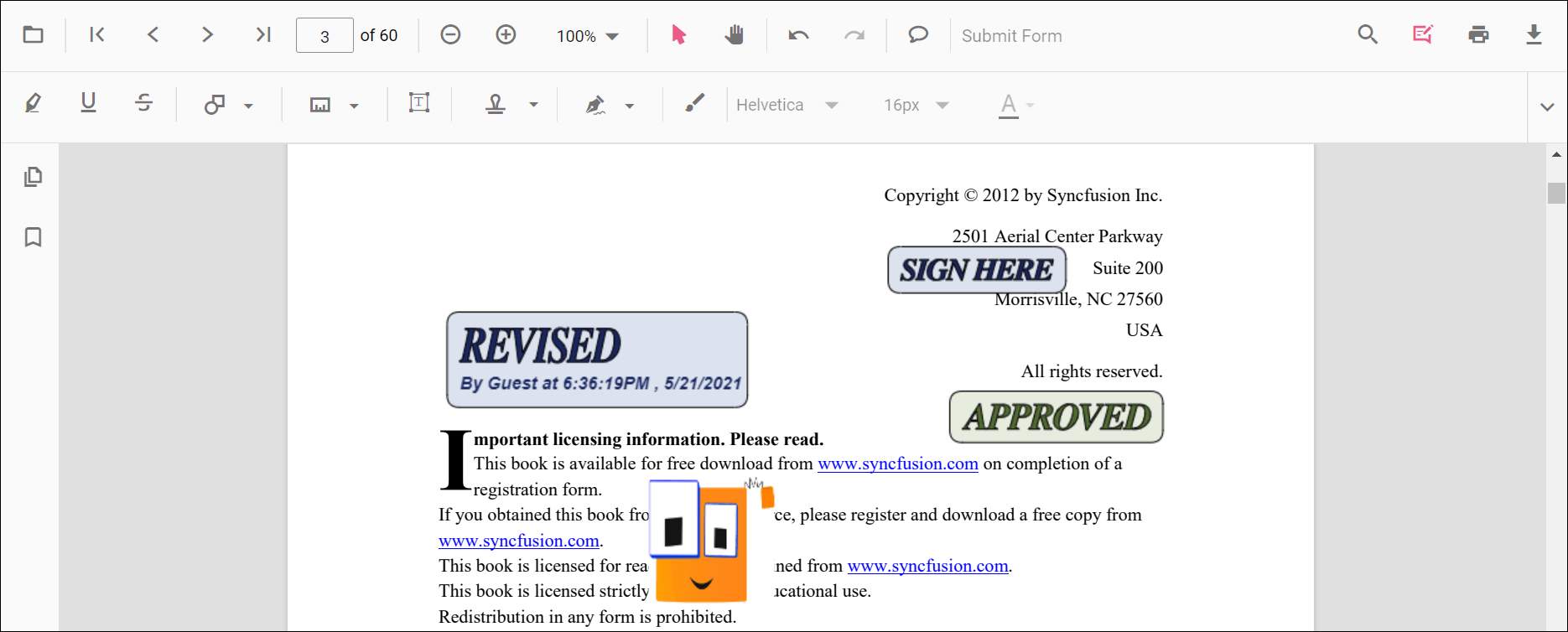
Add stamp annotations to the PDF document
The stamp annotations can be added to the PDF document using the annotation toolbar.
- Click the Edit Annotation button in the PDF Viewer toolbar. A toolbar appears below it.
- Click the Stamp Annotation drop-down button. The pop-up lists available stamp annotation types.
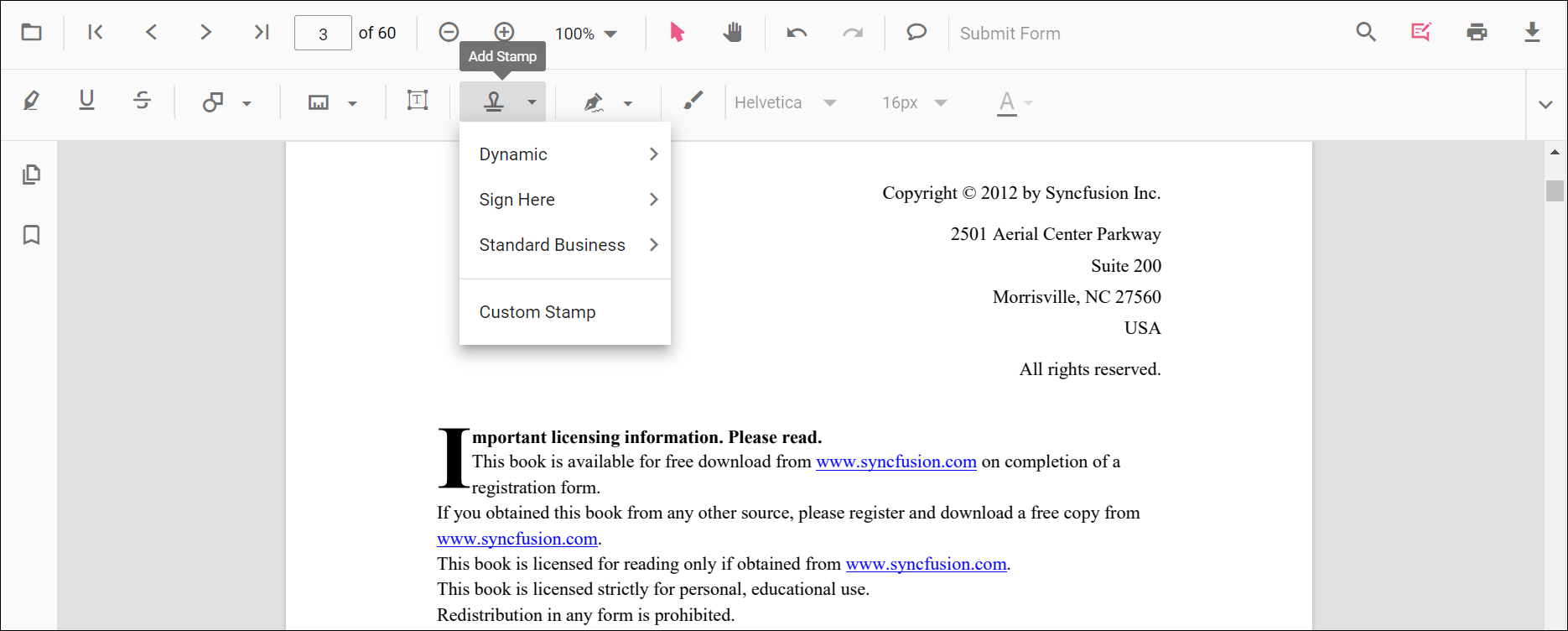
- Select a stamp type to enable its annotation mode.
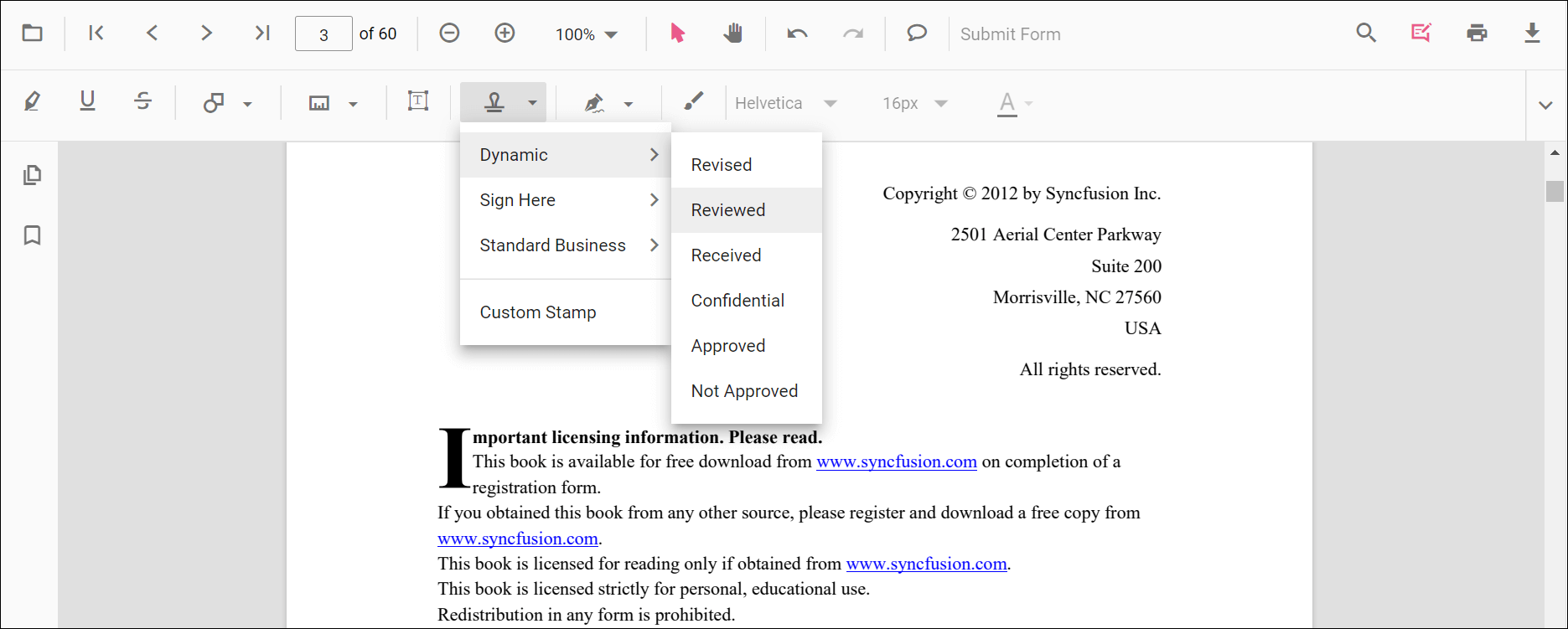
- Place the stamp on the pages of the PDF document.
When in pan mode and a stamp annotation tool is selected, the PDF Viewer switches to text select mode automatically for a smooth interaction experience.
The following examples switch to stamp annotation modes.
<button id="set" onclick="dynamicStamp()">Add dynamicStamp</button>
<button id="set" onclick="signStamp()">Add signStamp</button>
<button id="set" onclick="standardBusinessStamp()">Add standardBusinessStamp</button>

<div style="width:100%;height:600px">
    @Html.EJS().PdfViewer("pdfviewer").DocumentPath("https://cdn.syncfusion.com/content/pdf/pdf-succinctly.pdf").Render()
</div>
<script>
    function dynamicStamp() {
        var pdfViewer = document.getElementById('pdfviewer').ej2_instances[0];
        pdfViewer.annotation.setAnnotationMode('Stamp', 'NotApproved');
    }

    function signStamp() {
        var pdfViewer = document.getElementById('pdfviewer').ej2_instances[0];
        pdfViewer.annotation.setAnnotationMode('Stamp', null, 'Witness');
    }
    function standardBusinessStamp() {
        var pdfViewer = document.getElementById('pdfviewer').ej2_instances[0];
        pdfViewer.annotation.setAnnotationMode('Stamp', null, null, 'Approved');
    }
</script>
<button id="set" onclick="dynamicStamp()">Add dynamicStamp</button>
<button id="set" onclick="signStamp()">Add signStamp</button>
<button id="set" onclick="standardBusinessStamp()">Add standardBusinessStamp</button>
<div style="width:100%;height:600px">
@Html.EJS().PdfViewer("pdfviewer").ServiceUrl(VirtualPathUtility.ToAbsolute("~/PdfViewer/")).DocumentPath("https://cdn.syncfusion.com/content/pdf/pdf-succinctly.pdf").Render()
</div>
<script>
function dynamicStamp() {
var pdfViewer = document.getElementById('pdfviewer').ej2_instances[0];
pdfViewer.annotation.setAnnotationMode('Stamp', 'NotApproved');
}
function signStamp() {
var pdfViewer = document.getElementById('pdfviewer').ej2_instances[0];
pdfViewer.annotation.setAnnotationMode('Stamp', null, 'Witness');
}
function standardBusinessStamp() {
var pdfViewer = document.getElementById('pdfviewer').ej2_instances[0];
pdfViewer.annotation.setAnnotationMode('Stamp', null, null, 'Approved');
}
</script>Add a custom stamp to the PDF document
- Click the Edit Annotation button in the PDF Viewer toolbar. A toolbar appears below it.
- Click the Stamp Annotation drop-down button. The pop-up lists available stamp annotation types.
- Click the Custom Stamp button.
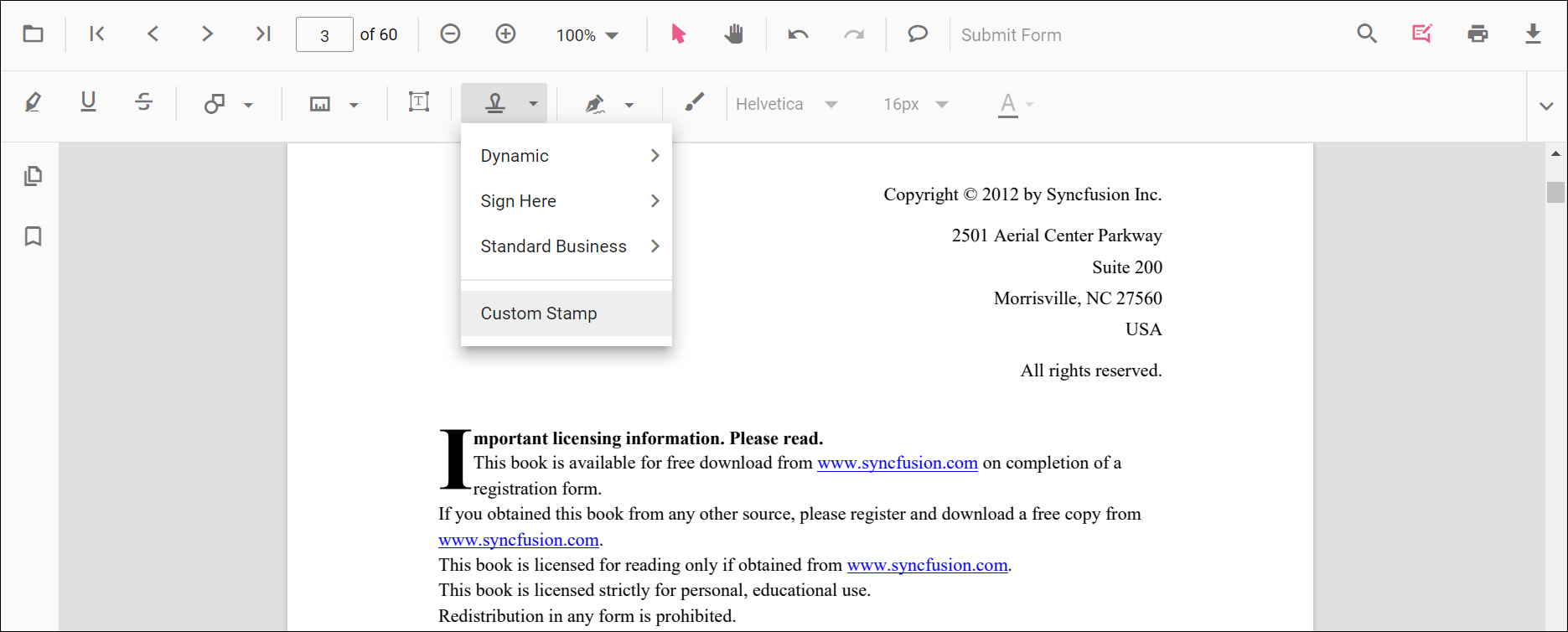
- In the file explorer dialog, choose an image and add it to the PDF page.
Only JPG and JPEG image formats are supported for custom stamp annotations.
Add Text Stamp and Image Stamp
The Stamp tool includes both Text Stamp and Image Stamp options alongside the built-in dynamic and business stamps. These features belong to the same Stamp annotation category and are documented on this page instead of as separate pages.
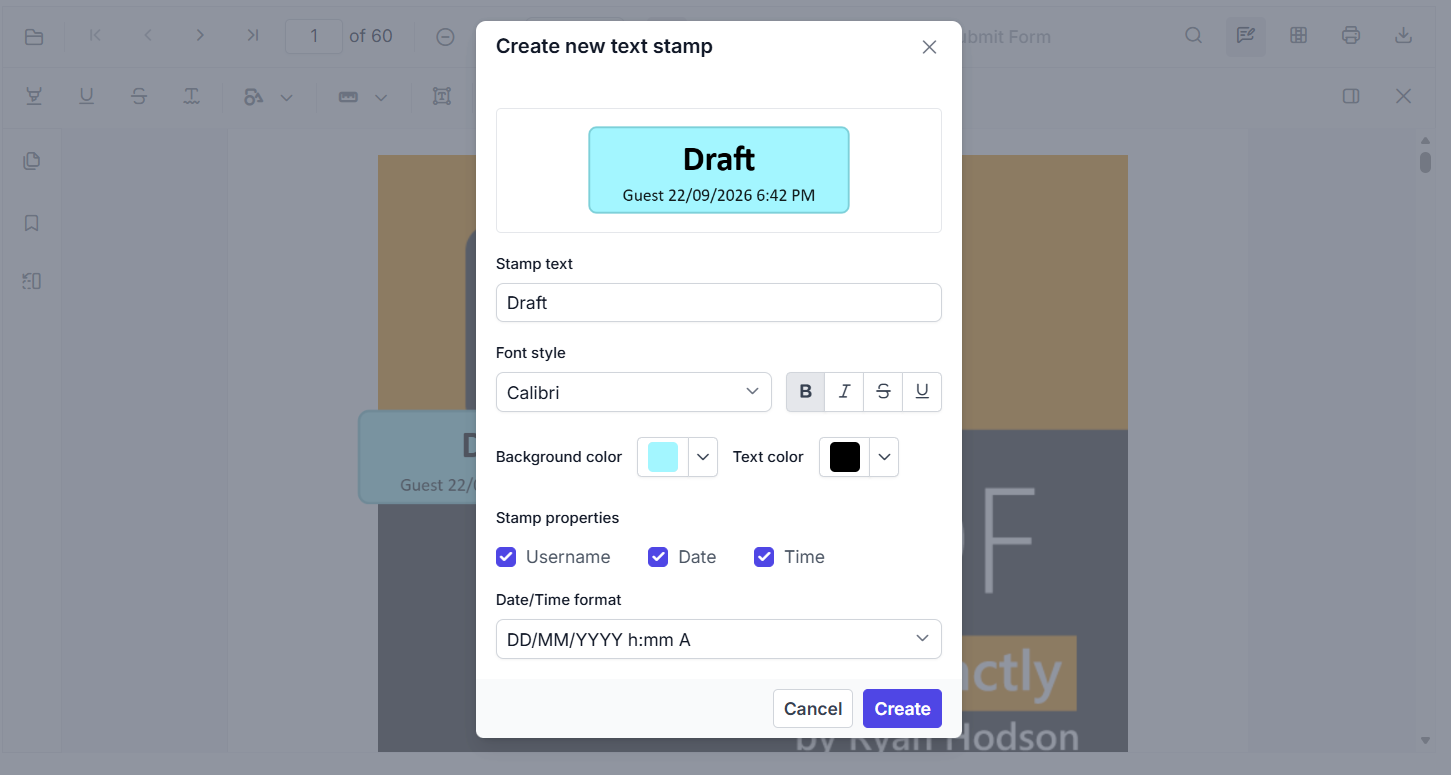
Add a text stamp in the UI
- Open the Annotation Toolbar.
- Click Stamp to open the stamp gallery.
- Select Text Stamp.
- In the Create new text stamp dialog, configure the title, subtitle, font, color, background, date/time format, and styling options such as bold, underline, and strikeout.
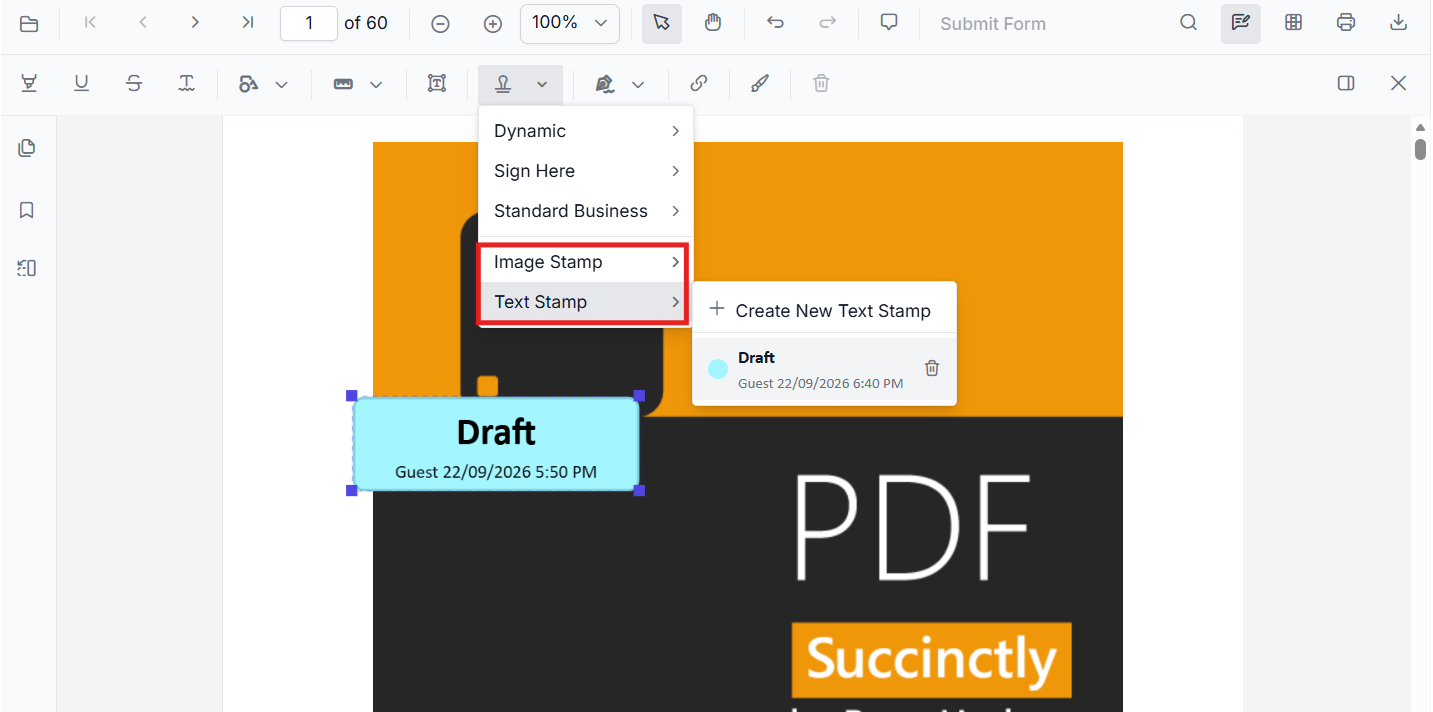
- Click Create to place the stamp on the page.
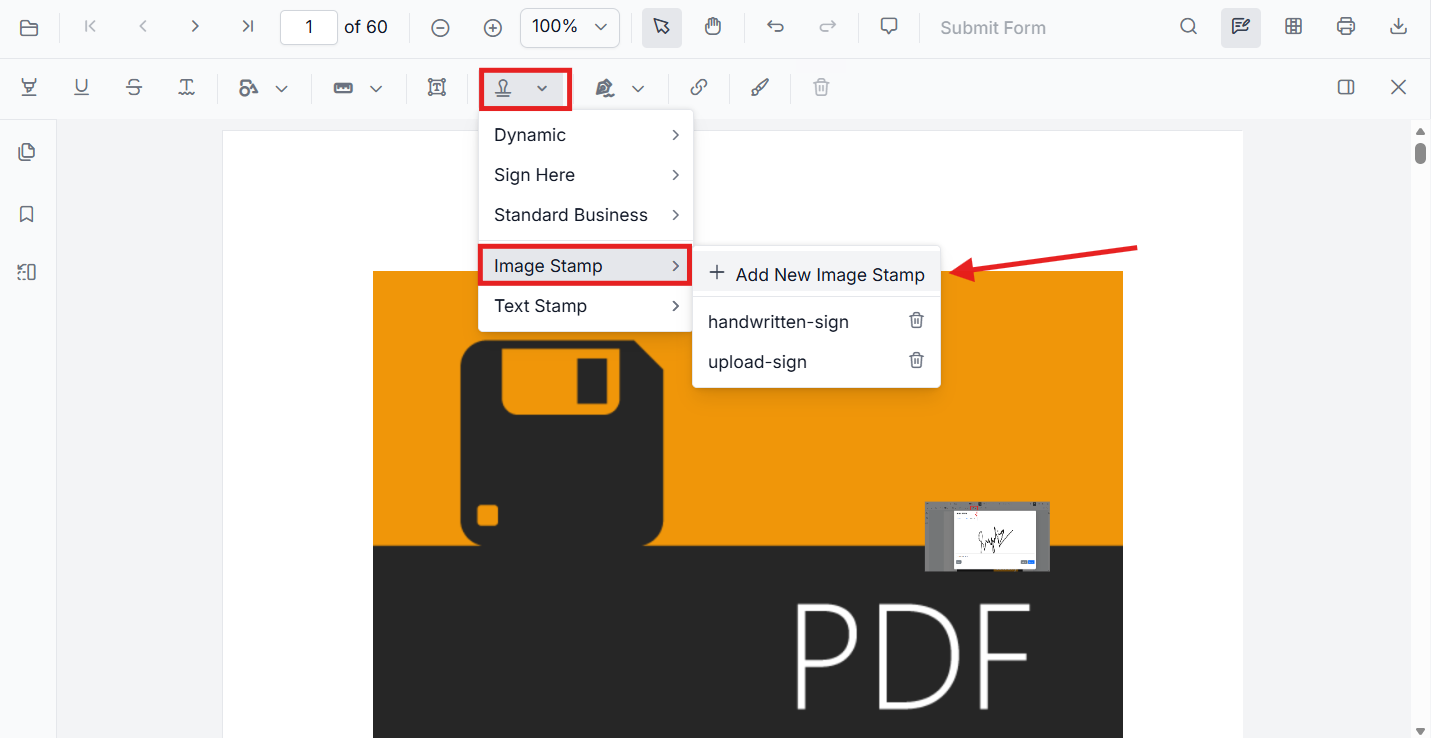
Add an image stamp in the UI
- Open the Annotation Toolbar.
- Click Stamp to open the stamp gallery.
- Select Image Stamp.
- Choose an image source or upload the required image.
- Click the PDF page to place the image stamp.
Add predefined text stamps to the submenu
You can add predefined text stamps and show them in the Text Stamp submenu by configuring customTextStamps in the viewer settings. Use fontFamilyCollection to provide the font list that should be available for text stamp styling in the UI.
<script>
window.onload = function () {
  var viewer = document.getElementById('pdfviewer').ej2_instances[0];
  viewer.customStampSettings = {
    fontFamilyCollection: ['Arial', 'Times New Roman', 'Courier New'],
    customTextStamps: [{
      title: 'Draft',
      subtitle: '[$author] DD/MMMM/YYYY, h:mm A',
      bold: true,
      textColor: '#000000',
      backgroundColor: '#1693f8',
      fontFamily: 'Arial'
    }]
  };
};
</script>
Add custom text stamp annotation programmatically
Use addAnnotation('Stamp', ...) with customTextStamps to create a text stamp at a specific location.
<script>
function addTextStampProgrammatically() {
  var viewer = document.getElementById('pdfviewer').ej2_instances[0];
  viewer.annotation.addAnnotation('Stamp', {
    offset: { x: 100, y: 200 },
    pageNumber: 1,
    customTextStamps: [{
      title: 'Draft',
      subtitle: '[$author] DD/MMMM/YYYY, h:mm A',
      bold: true,
      textColor: '#000000',
      backgroundColor: '#1693f8',
      underline: true,
      fontFamily: 'Arial',
      strikeout: true
    }]
  });
}
</script>
Add image stamp annotation programmatically
Use addAnnotation('Stamp', ...) with an image source to insert a custom image stamp.
<script>
function addImageStampProgrammatically() {
  var viewer = document.getElementById('pdfviewer').ej2_instances[0];
  viewer.annotation.addAnnotation('Stamp', {
    offset: { x: 100, y: 300 },
    pageNumber: 1,
    width: 160,
    height: 80,
    customStamps: [{
      customStampName: 'Image',
      customStampImageSource: 'data:image/png;base64,REPLACE_WITH_YOUR_BASE64_IMAGE_DATA'
    }]
  });
}
</script>
The new Image Stamp and Text Stamp capabilities belong to the same Stamp annotation feature set and are best documented in the existing Stamp annotation page under a dedicated subsection.
Add a stamp annotation to the PDF document programmatically
The PDF Viewer library allows adding a stamp annotation programmatically using the addAnnotation() method.
Here are examples showing how to add stamp annotations programmatically using addAnnotation():
<button id="set" onclick="dynamicStamp()">Add dynamicStamp</button>
<button id="set" onclick="signStamp()">Add signStamp</button>
<button id="set" onclick="standardBusinessStamp()">Add standardBusinessStamp</button>
<button id="set" onclick="addCustomStamp()">Add addCustomStamp</button>
<div style="width:100%;height:600px">
    @Html.EJS().PdfViewer("pdfviewer").DocumentPath("https://cdn.syncfusion.com/content/pdf/pdf-succinctly.pdf").Render()
</div>
<script>
    function dynamicStamp() {
        var viewer = document.getElementById('pdfviewer').ej2_instances[0];
        viewer.annotation.addAnnotation("Stamp", {
            offset: { x: 200, y: 140 },
            pageNumber: 1
        }, 'Approved');
    }
    function signStamp() {
        var viewer = document.getElementById('pdfviewer').ej2_instances[0];
        viewer.annotation.addAnnotation("Stamp", {
            offset: { x: 200, y: 240 },
            pageNumber: 1
        }, undefined, 'Witness');
    }
    function standardBusinessStamp() {
        var viewer = document.getElementById('pdfviewer').ej2_instances[0];
        viewer.annotation.addAnnotation("Stamp", {
            offset: { x: 200, y: 340 },
            pageNumber: 1
        }, undefined, undefined, 'Approved');
    }
    function addCustomStamp() {
        var viewer = document.getElementById('pdfviewer').ej2_instances[0];
        viewer.annotation.addAnnotation('Stamp',
            {
                offset: { x: 100, y: 440 },
                width: 46,
                author: 'Guest',
                height: 100,
                isLock: true,
                pageNumber: 1,
                customStamps: [
                    {
                        customStampName: "Image",
                        customStampImageSource:
                            "data:image/jpeg;base64,/9j/4AAQSkZJRgABAQAAAQABAAD/2wCEAAkGBwgHBgkIBwgKCgkLDRYPDQwMDRsUFRAWIB0iIiAdHx8kKDQsJCYxJx8fLT0tMTU3Ojo6Iys/RD84QzQ5OjcBCgoKDQwNGg8PGjclHyU3Nzc3Nzc3Nzc3Nzc3Nzc3Nzc3Nzc3Nzc3Nzc3Nzc3Nzc3Nzc3Nzc3Nzc3Nzc3Nzc3N//AABEIAIIAqwMBIgACEQEDEQH/xAAbAAEAAgMBAQAAAAAAAAAAAAAABQYBAwQHAv/EAEEQAAEDAwIEAwYDBAYLAAAAAAECAwQABREGIRIxQVETYXEHFCIygZEVQmIjUnKCJCUzU6HRFhc1c5KisbKzwvD/xAAVAQEBAAAAAAAAAAAAAAAAAAAAAf/EABQRAQAAAAAAAAAAAAAAAAAAAAD/2gAMAwEAAhEDEQA/APcaUpQKUpQKUpQKUpQKUpQKVzXGdFtsN2ZPfbYjNJ4nHHDgJFfEK5Q5ttbuUaQhcNxvxUPcklPfflQdlYJxURpe/salthuMNpxEYvuNtKc28VKVcPGB2JB577Vyz7pNuUxy26eWlCml8Mu4OI4kR/0oB2Wvp2T17EJK43qDbloakOqL7m6I7TanHVjOMhCQTjzxgVut89i4Mqdj8Y4VlC0OIKFIUOYKTuOn0INRZZtWkrVLuDpIIHHJlPK4nX1dOJR5kk4A5DYDArVoWbHuVgTPjvF5Ul5xx5zhIBc4jkJyBlI+UHqE0FjpSlApSlApSlApSlApSlApSlApSlArClAczgVmqr7QZLptkezxHi1KvD4ihxKsFprBU6v6IB+pFBTdUKf1uUuFa0WpyUIVoYBx706chchXdKEhZSPLNXXVTsOw6NdjNxkvJS0iLEidHnDhLaPME4z5ZzVHk6kTHu1vTpyE1Jf8L3Oww1ZDaGc4XJXjklXDhP6UlWd63ybrL1rq1mNa1hLcAKEeQgcTbbvyuScHnw5KGweZJPIVRYoDT6okfSlnfWhmCwlu43FGAUKxu2j9atyT+UHvirZBixLZBaiQ2kR4zCMIQnZKRWuz2yLZ7czBgo4GWh13KidypR6qJJJPevOvaFqCXqC4HSGmzxlxQbmvJJAPXwwe2M8R9R3FQc1xde9qOqEW+C44jTFuVxPvtnHvCvI+e4HYZPavV4sdmLGajxmktMtJCENpGAkDkBUbpixRNO2dm3Q0/Cj4lrPNazzUf/uWKlkkEZByKDNKUoFKUoFKUoFKUoFKwahZ2p7dFfMZhTs+ZnHu0FHirB/VjZHqogUE3WOIYzUApzUlwBKUxLOwQCFL/bv467DCEn6qr5i6btk5ht+ZOlXlCxlLkiTxtr8whGG8fy0HdK1FZorymHbjH8dPNlC+NY/lTk1XNTe0m12SCXBFnrkOpX7uh6ItkKUBzPGEnhzjcA1bokKLAZS1BjMx20jAQy2EjHoK85i6PuOovaFNv+pWPDt8J/ggMKUCXktq+BX8HNXmT2G9HLF1trSyW2GrUFgbluT3eCIRIS26tS/iSjwgCcDl35Z3qBlSb/edVcN58e4tojKafiW2MfDQpRBXF8X5UnZPGsq5ZAr0TV2j52oL9Anx7wqCxHYWypLbeXAFH4lNqz8KiNs8x0qy2e1QrNbmYFuZDUdkYSkHOT1JPUk7k0HhsG6u3SHPeisLFwnucE95hOPdmc8DUNhR/OrCR5Ak9NvX9F6cRp20IZIR706AX1I5DA2Qn9KRsPvzJqGmXG0N6pfk3KTEhW2ykBsLKUh2Y4nKlY6lKCAOuVmuafry5T5rFs0vaHQ5JSVIm3FBaQhvq7wfNwjurAPnQZ9pms1WtlVmtDqRcnxwrdK+ERknqT0Vj7DftUN7OA1BilywWx65TnU8PjOAtMsJJzlbhBypXMhPFgADbrF6B0sNSagkzrk+5cbTDeUQ5IHwy3T+bHbYE/y9yK9sabQ02lDSAhCRhKUjAAoIaFaZ8gh++zg8vIKYsUFphB+/Ev8AmONuVTYGBgcqzSoFKUoFKUoFKUoFcV4mOW+2yJbEN6Y40gqTHYGVuHsK7awRmg8rd/1gameJn2n8Ptv5YQn+78f+8cSFLI57AJ8/Oy2eyalhxkRo79htEVI2YgQ1uEH+JSgD68NW/FQ2r7yqxWCTNZR4knZqM1/ePLPChP3IoKRc4l91FqJ3TkfUst2Aygfiz7TDTaEA8mkEAnjPXfAH2NohaPehR2Y8bVF9QwygNttJMcJSkDAAAZru0hY02CyMxFK8SWv9rMfPN55W6lE9d9vQCpughmrLNZVxI1Fc19kupYUn/wAYP+NdQVMjD+khEhsfM40nhUPMp3z9D9K76xQRN/uNxjWj3qwW9F0krKfDa8YISUn83F25VVocf2kXdR/EJlrskZQxiM14ryR5ZJA9c/SrHo973m2SFjPhCfKSzn9wPLCceXbyxUpPmRrdDemTHUMx2UFbjizgJAoPGrbpyJBRPvEi53STfhc34MRCVMrckLSvCT8aFEEjBUQdhUlfbHcrcItuYvc+VqbUBDcpf7PgDSfnJPBxBCQcDBGcnlUn7Om4kly+aonhbPBPkeGiRsIqCEqUcHkSMZ9K5bRqqMbjJ1E5FkTrndFe72m2sAF1MVBI4iD8iVKyoqO2w7VRbrJpRdkt7MGDe56GGhgJ8Njn1P8AZ9fPNd5gXNKQEXt0q7uRmz/0AqFja29znGFq2EmxuqaLzDrkhK2XUj5gF7YUNvhqsX+66nvtqlarsrsmDa7aUvQIqQULuCUqHiLdGPk4c8I686g9BMK8/lu7IxyzCB/9q4bpJkWeP7xd9TQojGeHjdipRk9hlW5/yrF21raoEGM/HcM+TMSDEhwyFuv55YA5DfcnYVx2fTD9wm/jeskMS7goYYhY42IKeyQeajtlR68tqCUjtXWVHakQL/FejupC23PcwsLSeoKVgEVsLWomsFMm1yAM5C2HGir6hSsfY1B6ILViuV50utSWkRpHvNvQTgGO6OLCe/CviB7bVMXjVMC2vCG0VTrk4MtQIeHHleZHJCf1KwKDTcNSqskB2XqSCYjTQ3fYcDzSj0SOSgSdhlP1r50FqherbM5cVQVQwmQtkNlfFxBON8/XB8wa4JNsfUzJ1Jq/wXFQWnH4tvbPEzFCUk8RyPjd2+bkOQ7nHs0iSLRY7dBkKUoy4gnYV8yHFEFxPoCtOPU+VBdaUpQKUpQKqF4H4xry027YxrYyq4yB3cPwND/vV9BVvNVTRf8ATrhqC9KIUJU4x2T2aZHAB/xcZ+tBa6UpQKr+r7lIjRWrdaz/AFrcleBF2z4W3xOq8kDf1wOtSV5ukSz216fOc4GGhk4GSo9EpHVROwHU1DaWtst2S9qG+N8Nzlp4WWSc+6R85S0P1dVHqfSgm7Rb2bTbItvjcXhR2g2kqOVKx1J6k8zVbfP+leoSxkGx2h7LxztJlD8h6FCOZ/VjtXdq25ymWY9ptSv61uSi2yr+4Rj43T5JHLzIrRfHIujtCy/dthFiqQyD8zrqhgZ7qUo/40FJsbL2q7W/YYchUdqdMlXC5SEDJQhbq/CbHTKuEEj90edXfRWi4Gk4yvAUqTMdADsp35ikckj91I7Vn2e6bTpnTUaG5hUtweLJcHVw9PQch6VZ6Dhudot12aQ1dIEWa2hXEhEllLgSe4Cga7OBPBwYHDjGMbYr6pQRNp03ZrM669arVChuu/OphkJJ8tunlUt0pSgjLxYLVew2LtAYleEctqcT8SPRXMfevq0WO12VtTdpgRoiVHKy02AVnuo8z9akaUEBr2O9L0beI8dtx1xyMpIQ2kqUodQANycZrk07JVeLyq4R2HmrZCiiJFW62UF9SilS1AHfhHAgA7b8XlVqIzWMb0GaUpQKUpQc9wkCJAkyVcmWlOH6AmoL2bsqZ0LZi4SXHowfcUeZU58ZP3VUpqNlcjT1zYaGVuRHUJA6koIFcuiZDcnR9lea+RcFkgdvgG1BN1omS48GM7JluoZYaSVuOLOEpSOZJrXdLjEtUF2bcJLceM0MrccOAP8AP0qqR4czWk1qfd2HItgZWFxLe6MLlKHJ14dE9kH1NBttDEjVVzYvtxaUza4547ZCdThSz0kLHQ4+UdAc86tcmQzDjOyJLiW2WUFxxxWwSkDJJ+lbQAOVVPU6vx29xdLsqPgBKZdzIG3ghWEtE9CtX/Kk0GzSTDlwekamnNlL08BMNCs5ZijdAweRVniPqB0qsarce1XrezWlghVsiTCp3B/tFtDicPok8CP4lq7VedSzXYFr8OBwpmyVCPEyPhStQPxEfupAKj5JNVz2eW9t2RIvLJWqGlsQbetXN1pCsuPerjmVZ6gCqLyBis0pUClKUClKUClKUClKUClKUClKUGCMjFVNqw36yeOxpmbb/wAPdcU43GntLPuqlHJCFJO6ckkJI2zzq20oKtE0iZE5q46mnKu8to8TLSmwiMwe6G99/wBSiTVoGwrNcV4uUez2yTcJiiGY7ZWrAyT2AHUk7D1oMXq6R7PapNxlk+FHQVkAZKj0SB1JOAPWozRtqfhW5ybcf9qXJz3qZk54FEbNg9kDCfoT1qGi++alvEGJdGwlq2hE+e0FApTKVu0we4Qk8R7nhNXkcqCs6q0zK1DcIWbkqNbW23ESmWk4ceCsZAV+UEAgnngnvViix2okZqPHbS2y0kIbQkYCUjYAVtpQKUpQKUpQKUpQKUpQKUpQKUpQKUpQKUpQKouv7mwi7W2HJBdZiJNxXHSd5DoUER2gOpU4rI/gq9VxO2i3PXRu6OwmFz2m/DbkKQCtKck4B+p+9BxaTtblqtQEvhM+UtUqatO4U8vdW/YbJHkkVNVgDFZoFKUoFKUoFKUoFKUoFKUoFKUoFKUoFKUoFKUoFKUoFKUoFKUoFKUoFKUoFKUoFKUoFKUoFKUoP//Z"
                    }
                ]
            });
    }
</script>
<button id="set" onclick="dynamicStamp()">Add dynamicStamp</button>
<button id="set" onclick="signStamp()">Add signStamp</button>
<button id="set" onclick="standardBusinessStamp()">Add standardBusinessStamp</button>
<button id="set" onclick="addCustomStamp()">Add addCustomStamp</button>
<div style="width:100%;height:600px">
@Html.EJS().PdfViewer("pdfviewer").ServiceUrl(VirtualPathUtility.ToAbsolute("~/PdfViewer/")).DocumentPath("https://cdn.syncfusion.com/content/pdf/pdf-succinctly.pdf").Render()
</div>
<script>
function dynamicStamp() {
var viewer = document.getElementById('pdfviewer').ej2_instances[0];
viewer.annotation.addAnnotation("Stamp", {
offset: { x: 200, y: 140 },
pageNumber: 1
}, 'Approved');
}
function signStamp() {
var viewer = document.getElementById('pdfviewer').ej2_instances[0];
viewer.annotation.addAnnotation("Stamp", {
offset: { x: 200, y: 240 },
pageNumber: 1
}, undefined, 'Witness');
}
function standardBusinessStamp() {
var viewer = document.getElementById('pdfviewer').ej2_instances[0];
viewer.annotation.addAnnotation("Stamp", {
offset: { x: 200, y: 340 },
pageNumber: 1
}, undefined, undefined, 'Approved');
}
function addCustomStamp() {
var viewer = document.getElementById('pdfviewer').ej2_instances[0];
viewer.annotation.addAnnotation('Stamp',
{
offset: { x: 100, y: 440 },
width: 46,
author: 'Guest',
height: 100,
isLock: true,
pageNumber: 1,
customStamps: [
{
customStampName: "Image",
customStampImageSource:
"data:image/jpeg;base64,/9j/4AAQSkZJRgABAQAAAQABAAD/2wCEAAkGBwgHBgkIBwgKCgkLDRYPDQwMDRsUFRAWIB0iIiAdHx8kKDQsJCYxJx8fLT0tMTU3Ojo6Iys/RD84QzQ5OjcBCgoKDQwNGg8PGjclHyU3Nzc3Nzc3Nzc3Nzc3Nzc3Nzc3Nzc3Nzc3Nzc3Nzc3Nzc3Nzc3Nzc3Nzc3Nzc3Nzc3N//AABEIAIIAqwMBIgACEQEDEQH/xAAbAAEAAgMBAQAAAAAAAAAAAAAABQYBAwQHAv/EAEEQAAEDAwIEAwYDBAYLAAAAAAECAwQABREGIRIxQVETYXEHFCIygZEVQmIjUnKCJCUzU6HRFhc1c5KisbKzwvD/xAAVAQEBAAAAAAAAAAAAAAAAAAAAAf/EABQRAQAAAAAAAAAAAAAAAAAAAAD/2gAMAwEAAhEDEQA/APcaUpQKUpQKUpQKUpQKUpQKVzXGdFtsN2ZPfbYjNJ4nHHDgJFfEK5Q5ttbuUaQhcNxvxUPcklPfflQdlYJxURpe/salthuMNpxEYvuNtKc28VKVcPGB2JB577Vyz7pNuUxy26eWlCml8Mu4OI4kR/0oB2Wvp2T17EJK43qDbloakOqL7m6I7TanHVjOMhCQTjzxgVut89i4Mqdj8Y4VlC0OIKFIUOYKTuOn0INRZZtWkrVLuDpIIHHJlPK4nX1dOJR5kk4A5DYDArVoWbHuVgTPjvF5Ul5xx5zhIBc4jkJyBlI+UHqE0FjpSlApSlApSlApSlApSlApSlApSlArClAczgVmqr7QZLptkezxHi1KvD4ihxKsFprBU6v6IB+pFBTdUKf1uUuFa0WpyUIVoYBx706chchXdKEhZSPLNXXVTsOw6NdjNxkvJS0iLEidHnDhLaPME4z5ZzVHk6kTHu1vTpyE1Jf8L3Oww1ZDaGc4XJXjklXDhP6UlWd63ybrL1rq1mNa1hLcAKEeQgcTbbvyuScHnw5KGweZJPIVRYoDT6okfSlnfWhmCwlu43FGAUKxu2j9atyT+UHvirZBixLZBaiQ2kR4zCMIQnZKRWuz2yLZ7czBgo4GWh13KidypR6qJJJPevOvaFqCXqC4HSGmzxlxQbmvJJAPXwwe2M8R9R3FQc1xde9qOqEW+C44jTFuVxPvtnHvCvI+e4HYZPavV4sdmLGajxmktMtJCENpGAkDkBUbpixRNO2dm3Q0/Cj4lrPNazzUf/uWKlkkEZByKDNKUoFKUoFKUoFKUoFKwahZ2p7dFfMZhTs+ZnHu0FHirB/VjZHqogUE3WOIYzUApzUlwBKUxLOwQCFL/bv467DCEn6qr5i6btk5ht+ZOlXlCxlLkiTxtr8whGG8fy0HdK1FZorymHbjH8dPNlC+NY/lTk1XNTe0m12SCXBFnrkOpX7uh6ItkKUBzPGEnhzjcA1bokKLAZS1BjMx20jAQy2EjHoK85i6PuOovaFNv+pWPDt8J/ggMKUCXktq+BX8HNXmT2G9HLF1trSyW2GrUFgbluT3eCIRIS26tS/iSjwgCcDl35Z3qBlSb/edVcN58e4tojKafiW2MfDQpRBXF8X5UnZPGsq5ZAr0TV2j52oL9Anx7wqCxHYWypLbeXAFH4lNqz8KiNs8x0qy2e1QrNbmYFuZDUdkYSkHOT1JPUk7k0HhsG6u3SHPeisLFwnucE95hOPdmc8DUNhR/OrCR5Ak9NvX9F6cRp20IZIR706AX1I5DA2Qn9KRsPvzJqGmXG0N6pfk3KTEhW2ykBsLKUh2Y4nKlY6lKCAOuVmuafry5T5rFs0vaHQ5JSVIm3FBaQhvq7wfNwjurAPnQZ9pms1WtlVmtDqRcnxwrdK+ERknqT0Vj7DftUN7OA1BilywWx65TnU8PjOAtMsJJzlbhBypXMhPFgADbrF6B0sNSagkzrk+5cbTDeUQ5IHwy3T+bHbYE/y9yK9sabQ02lDSAhCRhKUjAAoIaFaZ8gh++zg8vIKYsUFphB+/Ev8AmONuVTYGBgcqzSoFKUoFKUoFKUoFcV4mOW+2yJbEN6Y40gqTHYGVuHsK7awRmg8rd/1gameJn2n8Ptv5YQn+78f+8cSFLI57AJ8/Oy2eyalhxkRo79htEVI2YgQ1uEH+JSgD68NW/FQ2r7yqxWCTNZR4knZqM1/ePLPChP3IoKRc4l91FqJ3TkfUst2Aygfiz7TDTaEA8mkEAnjPXfAH2NohaPehR2Y8bVF9QwygNttJMcJSkDAAAZru0hY02CyMxFK8SWv9rMfPN55W6lE9d9vQCpughmrLNZVxI1Fc19kupYUn/wAYP+NdQVMjD+khEhsfM40nhUPMp3z9D9K76xQRN/uNxjWj3qwW9F0krKfDa8YISUn83F25VVocf2kXdR/EJlrskZQxiM14ryR5ZJA9c/SrHo973m2SFjPhCfKSzn9wPLCceXbyxUpPmRrdDemTHUMx2UFbjizgJAoPGrbpyJBRPvEi53STfhc34MRCVMrckLSvCT8aFEEjBUQdhUlfbHcrcItuYvc+VqbUBDcpf7PgDSfnJPBxBCQcDBGcnlUn7Om4kly+aonhbPBPkeGiRsIqCEqUcHkSMZ9K5bRqqMbjJ1E5FkTrndFe72m2sAF1MVBI4iD8iVKyoqO2w7VRbrJpRdkt7MGDe56GGhgJ8Njn1P8AZ9fPNd5gXNKQEXt0q7uRmz/0AqFja29znGFq2EmxuqaLzDrkhK2XUj5gF7YUNvhqsX+66nvtqlarsrsmDa7aUvQIqQULuCUqHiLdGPk4c8I686g9BMK8/lu7IxyzCB/9q4bpJkWeP7xd9TQojGeHjdipRk9hlW5/yrF21raoEGM/HcM+TMSDEhwyFuv55YA5DfcnYVx2fTD9wm/jeskMS7goYYhY42IKeyQeajtlR68tqCUjtXWVHakQL/FejupC23PcwsLSeoKVgEVsLWomsFMm1yAM5C2HGir6hSsfY1B6ILViuV50utSWkRpHvNvQTgGO6OLCe/CviB7bVMXjVMC2vCG0VTrk4MtQIeHHleZHJCf1KwKDTcNSqskB2XqSCYjTQ3fYcDzSj0SOSgSdhlP1r50FqherbM5cVQVQwmQtkNlfFxBON8/XB8wa4JNsfUzJ1Jq/wXFQWnH4tvbPEzFCUk8RyPjd2+bkOQ7nHs0iSLRY7dBkKUoy4gnYV8yHFEFxPoCtOPU+VBdaUpQKUpQKqF4H4xry027YxrYyq4yB3cPwND/vV9BVvNVTRf8ATrhqC9KIUJU4x2T2aZHAB/xcZ+tBa6UpQKr+r7lIjRWrdaz/AFrcleBF2z4W3xOq8kDf1wOtSV5ukSz216fOc4GGhk4GSo9EpHVROwHU1DaWtst2S9qG+N8Nzlp4WWSc+6R85S0P1dVHqfSgm7Rb2bTbItvjcXhR2g2kqOVKx1J6k8zVbfP+leoSxkGx2h7LxztJlD8h6FCOZ/VjtXdq25ymWY9ptSv61uSi2yr+4Rj43T5JHLzIrRfHIujtCy/dthFiqQyD8zrqhgZ7qUo/40FJsbL2q7W/YYchUdqdMlXC5SEDJQhbq/CbHTKuEEj90edXfRWi4Gk4yvAUqTMdADsp35ikckj91I7Vn2e6bTpnTUaG5hUtweLJcHVw9PQch6VZ6Dhudot12aQ1dIEWa2hXEhEllLgSe4Cga7OBPBwYHDjGMbYr6pQRNp03ZrM669arVChuu/OphkJJ8tunlUt0pSgjLxYLVew2LtAYleEctqcT8SPRXMfevq0WO12VtTdpgRoiVHKy02AVnuo8z9akaUEBr2O9L0beI8dtx1xyMpIQ2kqUodQANycZrk07JVeLyq4R2HmrZCiiJFW62UF9SilS1AHfhHAgA7b8XlVqIzWMb0GaUpQKUpQc9wkCJAkyVcmWlOH6AmoL2bsqZ0LZi4SXHowfcUeZU58ZP3VUpqNlcjT1zYaGVuRHUJA6koIFcuiZDcnR9lea+RcFkgdvgG1BN1omS48GM7JluoZYaSVuOLOEpSOZJrXdLjEtUF2bcJLceM0MrccOAP8AP0qqR4czWk1qfd2HItgZWFxLe6MLlKHJ14dE9kH1NBttDEjVVzYvtxaUza4547ZCdThSz0kLHQ4+UdAc86tcmQzDjOyJLiW2WUFxxxWwSkDJJ+lbQAOVVPU6vx29xdLsqPgBKZdzIG3ghWEtE9CtX/Kk0GzSTDlwekamnNlL08BMNCs5ZijdAweRVniPqB0qsarce1XrezWlghVsiTCp3B/tFtDicPok8CP4lq7VedSzXYFr8OBwpmyVCPEyPhStQPxEfupAKj5JNVz2eW9t2RIvLJWqGlsQbetXN1pCsuPerjmVZ6gCqLyBis0pUClKUClKUClKUClKUClKUClKUGCMjFVNqw36yeOxpmbb/wAPdcU43GntLPuqlHJCFJO6ckkJI2zzq20oKtE0iZE5q46mnKu8to8TLSmwiMwe6G99/wBSiTVoGwrNcV4uUez2yTcJiiGY7ZWrAyT2AHUk7D1oMXq6R7PapNxlk+FHQVkAZKj0SB1JOAPWozRtqfhW5ybcf9qXJz3qZk54FEbNg9kDCfoT1qGi++alvEGJdGwlq2hE+e0FApTKVu0we4Qk8R7nhNXkcqCs6q0zK1DcIWbkqNbW23ESmWk4ceCsZAV+UEAgnngnvViix2okZqPHbS2y0kIbQkYCUjYAVtpQKUpQKUpQKUpQKUpQKUpQKUpQKUpQKUpQKouv7mwi7W2HJBdZiJNxXHSd5DoUER2gOpU4rI/gq9VxO2i3PXRu6OwmFz2m/DbkKQCtKck4B+p+9BxaTtblqtQEvhM+UtUqatO4U8vdW/YbJHkkVNVgDFZoFKUoFKUoFKUoFKUoFKUoFKUoFKUoFKUoFKUoFKUoFKUoFKUoFKUoFKUoFKUoFKUoFKUoFKUoP//Z"
}
]
});
}
</script>Edit an existing stamp annotation programmatically
To modify an existing stamp annotation programmatically, use the editAnnotation() method.
Here is an example of how you can use the editAnnotation() method:
<button id="set" onclick="editAnnotation()">Edit annotation programmatically</button>
<div style="width:100%;height:600px">
    @Html.EJS().PdfViewer("pdfviewer").DocumentPath("https://cdn.syncfusion.com/content/pdf/pdf-succinctly.pdf").Render()
</div>
<script>
    function editAnnotation() {
        var viewer = document.getElementById('pdfviewer').ej2_instances[0];
        for (let i = 0; i < viewer.annotationCollection.length; i++) {
            if (viewer.annotationCollection[i].shapeAnnotationType === "stamp") {
                var width = viewer.annotationCollection[i].bounds.width;
                var height = viewer.annotationCollection[i].bounds.height;
                viewer.annotationCollection[i].bounds = { x: 100, y: 100, width: width, height: height };
                viewer.annotationCollection[i].annotationSettings.isLock = true;
                viewer.annotation.editAnnotation(viewer.annotationCollection[i]);
            }
        }
    }
</script>
<button id="set" onclick="editAnnotation()">Edit annotation programmatically</button>
<div style="width:100%;height:600px">
@Html.EJS().PdfViewer("pdfviewer").ServiceUrl(VirtualPathUtility.ToAbsolute("~/PdfViewer/")).DocumentPath("https://cdn.syncfusion.com/content/pdf/pdf-succinctly.pdf").Render()
</div>
<script>
function editAnnotation() {
var viewer = document.getElementById('pdfviewer').ej2_instances[0];
for (let i = 0; i < viewer.annotationCollection.length; i++) {
if (viewer.annotationCollection[i].shapeAnnotationType === "stamp") {
var width = viewer.annotationCollection[i].bounds.width;
var height = viewer.annotationCollection[i].bounds.height;
viewer.annotationCollection[i].bounds = { x: 100, y: 100, width: width, height: height };
viewer.annotationCollection[i].annotationSettings.isLock = true;
viewer.annotation.editAnnotation(viewer.annotationCollection[i]);
}
}
}
</script>Set default properties during control initialization
Default properties for stamp annotations can be set before creating the control using StampSettings.
After changing default opacity using the Edit Opacity tool, the selected value is applied. The following example sets default stamp annotation settings.
<div style="width:100%;height:600px">
        @Html.EJS().PdfViewer("pdfviewer").DocumentPath("https://cdn.syncfusion.com/content/pdf/pdf-succinctly.pdf").StampSettings(new Syncfusion.EJ2.PdfViewer.PdfViewerStampSettings { Opacity = 0.3, Author = "Guest User" }).Render()
</div><div style="width:100%;height:600px">
@Html.EJS().PdfViewer("pdfviewer").ServiceUrl(VirtualPathUtility.ToAbsolute("~/PdfViewer/")).DocumentPath("https://cdn.syncfusion.com/content/pdf/pdf-succinctly.pdf").StampSettings(new Syncfusion.EJ2.PdfViewer.PdfViewerStampSettings { Opacity = 0.3, Author = "Guest User" }).Render()
</div>