Page Thumbnail Navigation in Angular PDF Viewer
14 Aug 20264 minutes to read
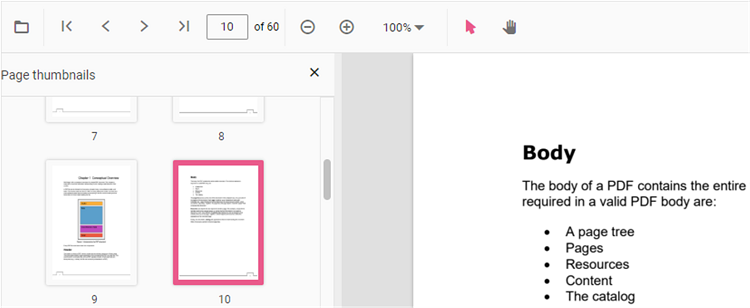
Thumbnails are miniature representations of PDF pages that let users navigate visually. This feature displays page thumbnails and supports quick navigation between pages.
Enable or disable thumbnail navigation using the examples below.
import { Component, OnInit } from '@angular/core';
import { PdfViewerComponent, LinkAnnotationService, BookmarkViewService, MagnificationService,
         ThumbnailViewService, ToolbarService, NavigationService,
         TextSearchService, AnnotationService, TextSelectionService,
         PrintService
       } from '@syncfusion/ej2-angular-pdfviewer';
@Component({
  selector: 'app-container',
  // specifies the template string for the PDF Viewer component
  template: `<div class="content-wrapper">
              <ejs-pdfviewer #pdfViewer id="pdfViewer"
                    [documentPath]='document'
                    [resourceUrl]="resource"
                    [enableThumbnail]='true'
                    style="height:640px;display:block">
              </ejs-pdfviewer>
            </div>`,
  providers: [ LinkAnnotationService, BookmarkViewService, MagnificationService,
               ThumbnailViewService, ToolbarService, NavigationService,
               AnnotationService, TextSearchService, TextSelectionService,
               PrintService]
  })
  export class AppComponent {
    @ViewChild('pdfViewer') public pdfViewer: PdfViewerComponent;
    public document: string = 'https://cdn.syncfusion.com/content/pdf/pdf-succinctly.pdf';
    public resource: string = 'https://cdn.syncfusion.com/ej2/23.2.6/dist/ej2-pdfviewer-lib';

}
import { Component, OnInit } from '@angular/core';
import { PdfViewerComponent, LinkAnnotationService, BookmarkViewService, MagnificationService,
ThumbnailViewService, ToolbarService, NavigationService,
TextSearchService, AnnotationService, TextSelectionService,
PrintService
} from '@syncfusion/ej2-angular-pdfviewer';
@Component({
selector: 'app-container',
// specifies the template string for the PDF Viewer component
template: `<div class="content-wrapper">
<ejs-pdfviewer id="pdfViewer"
[serviceUrl]='service'
[enableThumbnail]='true'
[documentPath]='document'
style="height:640px;display:block">
</ejs-pdfviewer>
</div>`,
providers: [ LinkAnnotationService, BookmarkViewService, MagnificationService,
ThumbnailViewService, ToolbarService, NavigationService,
AnnotationService, TextSearchService, TextSelectionService,
PrintService]
})
export class AppComponent {
@ViewChild('pdfViewer') public pdfViewer: PdfViewerComponent;
public service = 'https://document.syncfusion.com/web-services/pdf-viewer/api/pdfviewer';
public document = 'https://cdn.syncfusion.com/content/pdf/pdf-succinctly.pdf';
}