Page Navigation in Angular PDF Viewer
14 Aug 202614 minutes to read
The Angular PDF Viewer supports internal and external navigation methods.
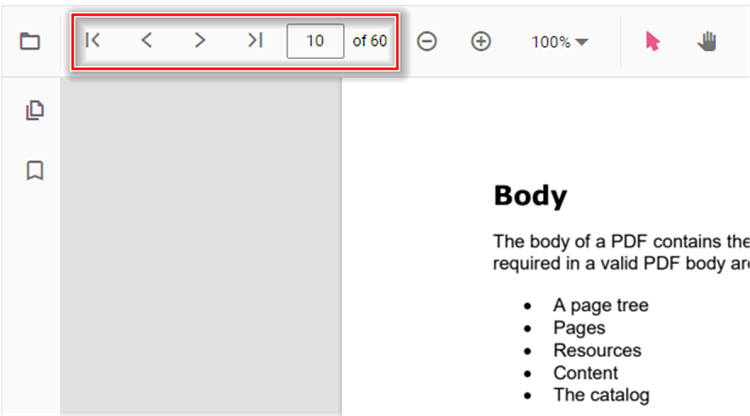
Toolbar page navigation options
The PDF Viewer default toolbar includes the following page navigation options:
- Go to page:- Navigates to a specified page in the PDF document.
- Show next page:- Navigates to the next page in the PDF document.
- Show previous page:- Navigates to the previous page in the PDF document.
- Show first page:- Navigates to the first page of the PDF document.
- Show last page:- Navigates to the last page of the PDF document.
<!DOCTYPE html>
<html lang="en">

<head>
    <title>Essential JS 2</title>
    <meta charset="utf-8" />
    <meta name="viewport" content="width=device-width, initial-scale=1.0, user-scalable=no" />
    <meta name="description" content="Essential JS 2" />
    <meta name="author" content="Syncfusion" />
    <link rel="shortcut icon" href="resources/favicon.ico" />
    <link href="https://maxcdn.bootstrapcdn.com/bootstrap/3.3.7/css/bootstrap.min.css" rel="stylesheet" />

    <!--style reference from app-->
    <link href="/styles/styles.css" rel="stylesheet" />

    <!--system js reference and configuration-->
    <script src="node_modules/systemjs/dist/system.src.js" type="text/javascript"></script>
    <script src="system.config.js" type="text/javascript"></script>
</head>

<body>
    <!--Element which will render as PdfViewer -->
    <div id="PdfViewer"></div>
</body>

</html>
Enable or disable the page navigation option in the PDF Viewer using the following code snippet.
import { Component, OnInit } from '@angular/core';
import { LinkAnnotationService, BookmarkViewService, MagnificationService,
         ThumbnailViewService, ToolbarService, NavigationService,
         TextSearchService, AnnotationService, TextSelectionService,
         PrintService
       } from '@syncfusion/ej2-angular-pdfviewer';
@Component({
  selector: 'app-container',
  // specifies the template string for the PDF Viewer component
  template: `<div class="content-wrapper">
               <ejs-pdfviewer id="pdfViewer"
                        [enableNavigation]='true'
                        [documentPath]='document'
                        [resourceUrl]="resource"
                        style="height:640px;display:block">
               </ejs-pdfviewer>
            </div>`,
  providers: [ LinkAnnotationService, BookmarkViewService, MagnificationService,
               ThumbnailViewService, ToolbarService, NavigationService,
               AnnotationService, TextSearchService, TextSelectionService,
               PrintService]
  })
  export class AppComponent {
      public document = 'https://cdn.syncfusion.com/content/pdf/pdf-succinctly.pdf';
      public resource: string = 'https://cdn.syncfusion.com/ej2/23.2.6/dist/ej2-pdfviewer-lib';
  }
import { Component, OnInit } from '@angular/core';
import { LinkAnnotationService, BookmarkViewService, MagnificationService,
ThumbnailViewService, ToolbarService, NavigationService,
TextSearchService, AnnotationService, TextSelectionService,
PrintService
} from '@syncfusion/ej2-angular-pdfviewer';
@Component({
selector: 'app-container',
// specifies the template string for the PDF Viewer component
template: `<div class="content-wrapper">
<ejs-pdfviewer id="pdfViewer"
[serviceUrl]='service'
[enableNavigation]='true'
[documentPath]='document'
style="height:640px;display:block">
</ejs-pdfviewer>
</div>`,
providers: [ LinkAnnotationService, BookmarkViewService, MagnificationService,
ThumbnailViewService, ToolbarService, NavigationService,
AnnotationService, TextSearchService, TextSelectionService,
PrintService]
})
export class AppComponent {
public service = 'https://document.syncfusion.com/web-services/pdf-viewer/api/pdfviewer';
public document = 'https://cdn.syncfusion.com/content/pdf/pdf-succinctly.pdf';
}
The following examples show how to perform page navigation programmatically.
<!DOCTYPE html>
<html lang="en">

<head>
    <title>Essential JS 2</title>
    <meta charset="utf-8" />
    <meta name="viewport" content="width=device-width, initial-scale=1.0, user-scalable=no" />
    <meta name="description" content="Essential JS 2" />
    <meta name="author" content="Syncfusion" />
    <link rel="shortcut icon" href="resources/favicon.ico" />
    <link href="https://maxcdn.bootstrapcdn.com/bootstrap/3.3.7/css/bootstrap.min.css" rel="stylesheet" />

    <!--style reference from app-->
    <link href="/styles/styles.css" rel="stylesheet" />

    <!--system js reference and configuration-->
    <script src="node_modules/systemjs/dist/system.src.js" type="text/javascript"></script>
    <script src="system.config.js" type="text/javascript"></script>
</head>

<body>
    <!--Element which will render as PdfViewer -->
    <button id="goToFirstPage">Go To First Page</button>
    <button id="goToLastPage">Go To Last Page</button>
    <button id="goToNextPage">Go To Next Page</button>
    <button id="goToPage">Go To Page</button>
    <button id="goToPreviousPage">Go To Previous Page</button>
    <div id="PdfViewer"></div>
</body>

</html>import { Component, OnInit, ViewChild } from '@angular/core';
import { PdfViewerComponent, LinkAnnotationService, BookmarkViewService, MagnificationService,
ThumbnailViewService, ToolbarService, NavigationService,
TextSearchService, AnnotationService, TextSelectionService,
PrintService
} from '@syncfusion/ej2-angular-pdfviewer';
@Component({
selector: 'app-container',
// specifies the template string for the PDF Viewer component
template: `<div class="content-wrapper">
<div class="btn-group" style="margin-bottom:8px; display:flex; gap:8px; flex-wrap:wrap;">
<button (click)="goToFirstPage()">Go To First Page</button>
<button (click)="goToLastPage()">Go To Last Page</button>
<button (click)="goToNextPage()">Go To Next Page</button>
<button (click)="goToPage()">Go To Page</button>
<button (click)="goToPreviousPage()">Go To Previous Page</button>
</div>
<ejs-pdfviewer #pdfViewer id="pdfViewer"
[documentPath]='document'
[resourceUrl]="resource"
style="height:640px;display:block">
</ejs-pdfviewer>
</div>`,
providers: [ LinkAnnotationService, BookmarkViewService, MagnificationService,
ThumbnailViewService, ToolbarService, NavigationService,
AnnotationService, TextSearchService, TextSelectionService,
PrintService]
})
export class AppComponent {
@ViewChild('pdfViewer') public pdfViewer: PdfViewerComponent;
public document = 'https://cdn.syncfusion.com/content/pdf/pdf-succinctly.pdf';
public resource: string = 'https://cdn.syncfusion.com/ej2/23.2.6/dist/ej2-pdfviewer-lib';
public goToFirstPage(): void { this.pdfViewer.navigation.goToFirstPage(); }
public goToLastPage(): void { this.pdfViewer.navigation.goToLastPage(); }
public goToNextPage(): void { this.pdfViewer.navigation.goToNextPage(); }
public goToPage(): void { this.pdfViewer.navigation.goToPage(4); }
public goToPreviousPage(): void { this.pdfViewer.navigation.goToPreviousPage(); }
}import { Component, OnInit, ViewChild } from '@angular/core';
import { PdfViewerComponent, LinkAnnotationService, BookmarkViewService, MagnificationService,
ThumbnailViewService, ToolbarService, NavigationService,
TextSearchService, AnnotationService, TextSelectionService,
PrintService
} from '@syncfusion/ej2-angular-pdfviewer';
@Component({
selector: 'app-container',
// specifies the template string for the PDF Viewer component
template: `<div class="content-wrapper">
<div class="btn-group" style="margin-bottom:8px; display:flex; gap:8px; flex-wrap:wrap;">
<button (click)="goToFirstPage()">Go To First Page</button>
<button (click)="goToLastPage()">Go To Last Page</button>
<button (click)="goToNextPage()">Go To Next Page</button>
<button (click)="goToPage()">Go To Page</button>
<button (click)="goToPreviousPage()">Go To Previous Page</button>
</div>
<ejs-pdfviewer #pdfViewer id="pdfViewer"
[serviceUrl]='service'
[documentPath]='document'
style="height:640px;display:block">
</ejs-pdfviewer>
</div>`,
providers: [ LinkAnnotationService, BookmarkViewService, MagnificationService,
ThumbnailViewService, ToolbarService, NavigationService,
AnnotationService, TextSearchService, TextSelectionService,
PrintService]
})
export class AppComponent {
@ViewChild('pdfViewer') public pdfViewer: PdfViewerComponent;
public service = 'https://document.syncfusion.com/web-services/pdf-viewer/api/pdfviewer';
public document = 'https://cdn.syncfusion.com/content/pdf/pdf-succinctly.pdf';
public goToFirstPage(): void {
this.pdfViewer.navigation.goToFirstPage();
}
public goToLastPage(): void {
this.pdfViewer.navigation.goToLastPage();
}
public goToNextPage(): void {
this.pdfViewer.navigation.goToNextPage();
}
public goToPage(): void {
this.pdfViewer.navigation.goToPage(4);
}
public goToPreviousPage(): void {
this.pdfViewer.navigation.goToPreviousPage();
}
}Try the sample on StackBlitz to run the programmatic page navigation example: StackBlitz sample.