Bookmark Navigation in Angular PDF Viewer
14 Aug 20267 minutes to read
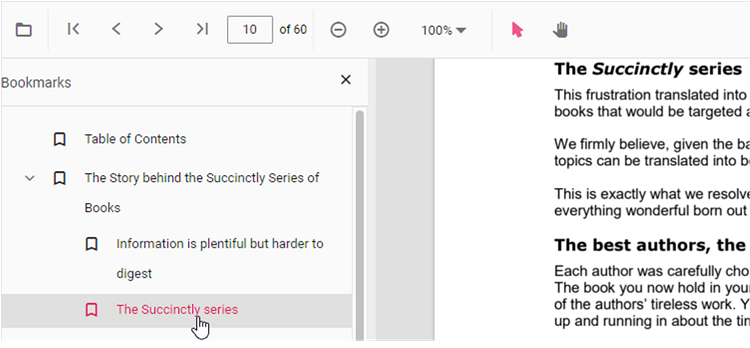
Bookmarks embedded in PDF files are loaded and made available for quick navigation within the viewer.
Enable or disable bookmark navigation using the examples below.
The examples show a Standalone (client-only) setup and a Server-Backed setup; the primary difference is the viewer’s resourceUrl/service configuration used to locate PDF resources.
import { Component, ViewEncapsulation, OnInit, ViewChild, AfterViewInit } from '@angular/core';
import {
  PdfViewerComponent,
  LinkAnnotationService,
  BookmarkViewService,
  MagnificationService,
  ThumbnailViewService,
  ToolbarService,
  NavigationService,
  TextSearchService,
  TextSelectionService,
  PrintService,
  AnnotationService,
  FormFieldsService,
  FormDesignerService,
  PageOrganizerService,
  PdfViewerModule,
} from '@syncfusion/ej2-angular-pdfviewer';

/**
 * Default PdfViewer Controller
 */
@Component({
  selector: 'app-root',
  // templateUrl: 'app.html',
    template: `
    <div class="control-section">
      <div class="content-wrapper">
        <button ejs-button cssClass="e-primary" id="getBookmarks">annotationSelector</button>
      </div>
    </div>
    <ejs-pdfviewer
      #pdfviewer
      id="pdfViewer"
      [documentPath]="document"
      [resourceUrl] = "resource"
      [enableBookmark]='true'
      style="height:640px;display:block">
    </ejs-pdfviewer>
    `,
  encapsulation: ViewEncapsulation.None,
  // tslint:disable-next-line:max-line-length
  providers: [
    LinkAnnotationService,
    BookmarkViewService,
    MagnificationService,
    ThumbnailViewService,
    ToolbarService,
    NavigationService,
    TextSearchService,
    TextSelectionService,
    PrintService,
    AnnotationService,
    FormFieldsService,
    FormDesignerService,
    PageOrganizerService,
  ],
  styleUrls: ['app.css'],
  standalone: true,
  imports: [PdfViewerModule],

})
export class AppComponent {
  @ViewChild('pdfviewer')
  public viewer: PdfViewerComponent;
  public document: string =
    'https://cdn.syncfusion.com/content/pdf/pdf-succinctly.pdf';
  public resource: string =
    'https://cdn.syncfusion.com/ej2/23.2.6/dist/ej2-pdfviewer-lib';

  ngOnInit(): void {
    // ngOnInit function
  }
}
import { Component, ViewEncapsulation, OnInit, ViewChild, AfterViewInit } from '@angular/core';
import {
PdfViewerComponent,
LinkAnnotationService,
BookmarkViewService,
MagnificationService,
ThumbnailViewService,
ToolbarService,
NavigationService,
TextSearchService,
TextSelectionService,
PrintService,
AnnotationService,
FormFieldsService,
FormDesignerService,
PageOrganizerService,
PdfViewerModule,
} from '@syncfusion/ej2-angular-pdfviewer';
/**
* Default PdfViewer Controller
*/
@Component({
selector: 'app-root',
// templateUrl: 'app.html',
template: `
<div class="control-section">
<div class="content-wrapper">
<button ejs-button cssClass="e-primary" id="getBookmarks">annotationSelector</button>
</div>
</div>
<ejs-pdfviewer
#pdfviewer
id="pdfViewer"
[documentPath]="document"
[resourceUrl] = "resource"
[enableBookmark]='true'
style="height:640px;display:block">
</ejs-pdfviewer>
`,
encapsulation: ViewEncapsulation.None,
// tslint:disable-next-line:max-line-length
providers: [
LinkAnnotationService,
BookmarkViewService,
MagnificationService,
ThumbnailViewService,
ToolbarService,
NavigationService,
TextSearchService,
TextSelectionService,
PrintService,
AnnotationService,
FormFieldsService,
FormDesignerService,
PageOrganizerService,
],
styleUrls: ['app.css'],
standalone: true,
imports: [PdfViewerModule],
})
export class AppComponent {
@ViewChild('pdfviewer')
public viewer: PdfViewerComponent;
public service = 'https://document.syncfusion.com/web-services/pdf-viewer/api/pdfviewer';
public document: string =
'https://cdn.syncfusion.com/content/pdf/pdf-succinctly.pdf';
ngOnInit(): void {
// ngOnInit function
}
}
Use the goToBookmark method to navigate to a bookmark programmatically. The method expects valid bookmark coordinates (zero-based page index and a Y offset). If the specified bookmark does not exist, the call may throw an error—guard calls with error handling or verify existence first using getBookmarks().
The examples below demonstrate using goToBookmark and getBookmarks(); do not modify code samples unless adapting them for a specific app.
<button id="gotobookmark">Specific Page</button>
import { Component, ViewChild, AfterViewInit } from '@angular/core';
import { PdfViewerComponent } from '@syncfusion/ej2-angular-pdfviewer';

@Component({
  selector: 'app-container',
  template: `<ejs-pdfviewer id="pdfViewer" #pdfViewer style="height:640px;display:block"></ejs-pdfviewer>`
})
export class AppComponent implements AfterViewInit {
  @ViewChild('pdfViewer', { static: false }) public viewer: PdfViewerComponent;

  ngAfterViewInit(): void {
    const btn = document.getElementById('gotobookmark');
    if (btn) {
      btn.addEventListener('click', () => {
        const x = 0; // page index
        const y = 0; // Y coordinate
        this.viewer.bookmark.goToBookmark(x, y);
      });
    }
  }
}
x - Specifies the pageIndex for navigate.
y - Specifies the Y coordinates value of the Page.
Also, you can use the getBookmarks method to retrieve a list of all the bookmarks in a PDF document. This method returns a List of Bookmark objects, which contain information about each bookmark.
Here is an example of how to use the getBookmarks method:
<button id="getBookmarks">retrieve bookmark</button>
import { Component, ViewChild, AfterViewInit } from '@angular/core';
import { PdfViewerComponent } from '@syncfusion/ej2-angular-pdfviewer';

@Component({
  selector: 'app-container',
  template: `<ejs-pdfviewer id="pdfViewer" #pdfViewer style="height:640px;display:block"></ejs-pdfviewer>`
})
export class AppComponent implements AfterViewInit {
  @ViewChild('pdfViewer', { static: false })
  public viewer: PdfViewerComponent;

  ngAfterViewInit(): void {
    const btn = document.getElementById('getBookmarks');
    if (btn) {
      btn.addEventListener('click', () => {
        const getBookmarks = this.viewer.bookmark.getBookmarks();
        console.log(getBookmarks);
      });
    }
  }
}
See also
    Related topics that demonstrate viewer features and module setup:

    - [Toolbar items](https://help.syncfusion.com/document-processing/pdf/pdf-viewer/angular/toolbar)
    - [Feature Modules](https://help.syncfusion.com/document-processing/pdf/pdf-viewer/angular/feature-module)