Create Markdown document on Linux
14 Aug 20265 minutes to read
Syncfusion® Essential® Markdown is a .NET Markdown library used to create, read, and edit Markdown documents programmatically without external dependencies. Using this library, you can create a Markdown document in .NET Core application on Linux.
Steps to create Markdown document programmatically in .NET Core application on Linux
Prerequisites:
- Visual Studio 2022.
- Install .NET 8 SDK or later.
Step 1: Execute the following command in Linux terminal to create a new .NET Core Console application.
dotnet new consoleStep 2: Install the Syncfusion.Markdown NuGet package as a reference to your project from NuGet.org by executing the following command.
dotnet add package Syncfusion.Markdown -s https://www.nuget.org/Starting with v34.x.x, if you reference Syncfusion® assemblies from the trial setup or from the NuGet feed, you must add a reference to the Syncfusion.Licensing assembly and include a valid license key in your application.
Install the Syncfusion.Licensing NuGet package and register the license key during application startup.
Syncfusion.Licensing.SyncfusionLicenseProvider.RegisterLicense("YOUR_LICENSE_KEY");For more information about generating and registering a license key, refer to the Syncfusion® licensing documentation.
Step 3: Add the following namespaces in the Program.cs file.
using Syncfusion.Office.Markdown;
using System.IO;
Step 4: Add the following code snippet in the Program.cs file. If you are using a licensed or trial Syncfusion package, register the license key at the start of the program:
// Creates a new instance of MarkdownDocument.
MarkdownDocument markdownDocument = new MarkdownDocument();
// Adds a heading to the Markdown document.
MdParagraph mdHeadingParagraph = markdownDocument.AddParagraph();
// Applies the Heading 1 style to the paragraph.
mdHeadingParagraph.ApplyParagraphStyle("Heading 1");
MdTextRange mdHeadingTextRange = mdHeadingParagraph.AddTextRange();
mdHeadingTextRange.Text = "Adventure Works Cycles";
// Adds a paragraph to the Markdown document.
MdParagraph mdParagraph = markdownDocument.AddParagraph();
MdTextRange mdTextRange = mdParagraph.AddTextRange();
mdTextRange.Text = "Adventure Works Cycles, the fictitious company on which the AdventureWorks sample databases are based, is a large, multinational manufacturing company. The company manufactures and sells metal and composite bicycles to North American, European and Asian commercial markets. While its base operation is in Bothell, Washington with 290 employees, several regional sales teams are located throughout their market base.";
// Adds the first list item.
MdParagraph item1 = markdownDocument.AddParagraph();
item1.ListFormat = new MdListFormat();
item1.ListFormat.IsNumbered = false;
item1.ListFormat.ListLevel = 0;
item1.ListFormat.ListValue = "- ";
item1.AddTextRange().Text = "First item";
// Adds the second list item.
MdParagraph item2 = markdownDocument.AddParagraph();
item2.ListFormat = new MdListFormat();
item2.ListFormat.IsNumbered = false;
item2.ListFormat.ListLevel = 0;
item2.ListFormat.ListValue = "- ";
item2.AddTextRange().Text = "Second item";
// Adds the third list item.
MdParagraph item3 = markdownDocument.AddParagraph();
item3.ListFormat = new MdListFormat();
item3.ListFormat.IsNumbered = false;
item3.ListFormat.ListLevel = 0;
item3.ListFormat.ListValue = "- ";
item3.AddTextRange().Text = "Third item";
// Adds a table to the Markdown document.
MdTable table = markdownDocument.AddTable();
table.ColumnAlignments.Add(MdColumnAlignment.Left);
table.ColumnAlignments.Add(MdColumnAlignment.Left);
// Adds the header row.
MdTableRow headerRow = table.AddTableRow();
MdTableCell header1 = headerRow.AddTableCell();
header1.Items.Add(new MdTextRange { Text = "Profile picture" });
MdTableCell header2 = headerRow.AddTableCell();
header2.Items.Add(new MdTextRange { Text = "Description" });

// Adds a data row.
MdTableRow dataRow = table.AddTableRow();
MdTableCell cell1 = dataRow.AddTableCell();
MdPicture picture = new MdPicture();
picture.Url = "Data\\photo.jpg";
picture.AltText = "Profile picture";
cell1.Items.Add(picture);
MdTableCell cell2 = dataRow.AddTableCell();
cell2.Items.Add(new MdTextRange { Text = "AdventureWorks Cycles, the fictitious company on which the AdventureWorks sample databases are based, is a large, multinational manufacturing company." });

//Create FileStream to save the MD file.
FileStream outputStream = new FileStream("Result.md", FileMode.Create, FileAccess.ReadWrite, FileShare.ReadWrite);
//Saves the MD file.
markdownDocument.Save(outputStream);
outputStream.Flush();
outputStream.Dispose();
markdownDocument.Dispose();
Step 5: Execute the following command to restore the NuGet packages.
dotnet restoreStep 6: Execute the following command in terminal to run the application.
dotnet runYou can download a complete working sample from GitHub.
The code sample references an image file (
photo.jpg). Download this asset from the GitHub sample Data folder and place it in the application’sDatafolder so theMdPicture.Urlvalue ("Data/photo.jpg") resolves correctly at runtime.
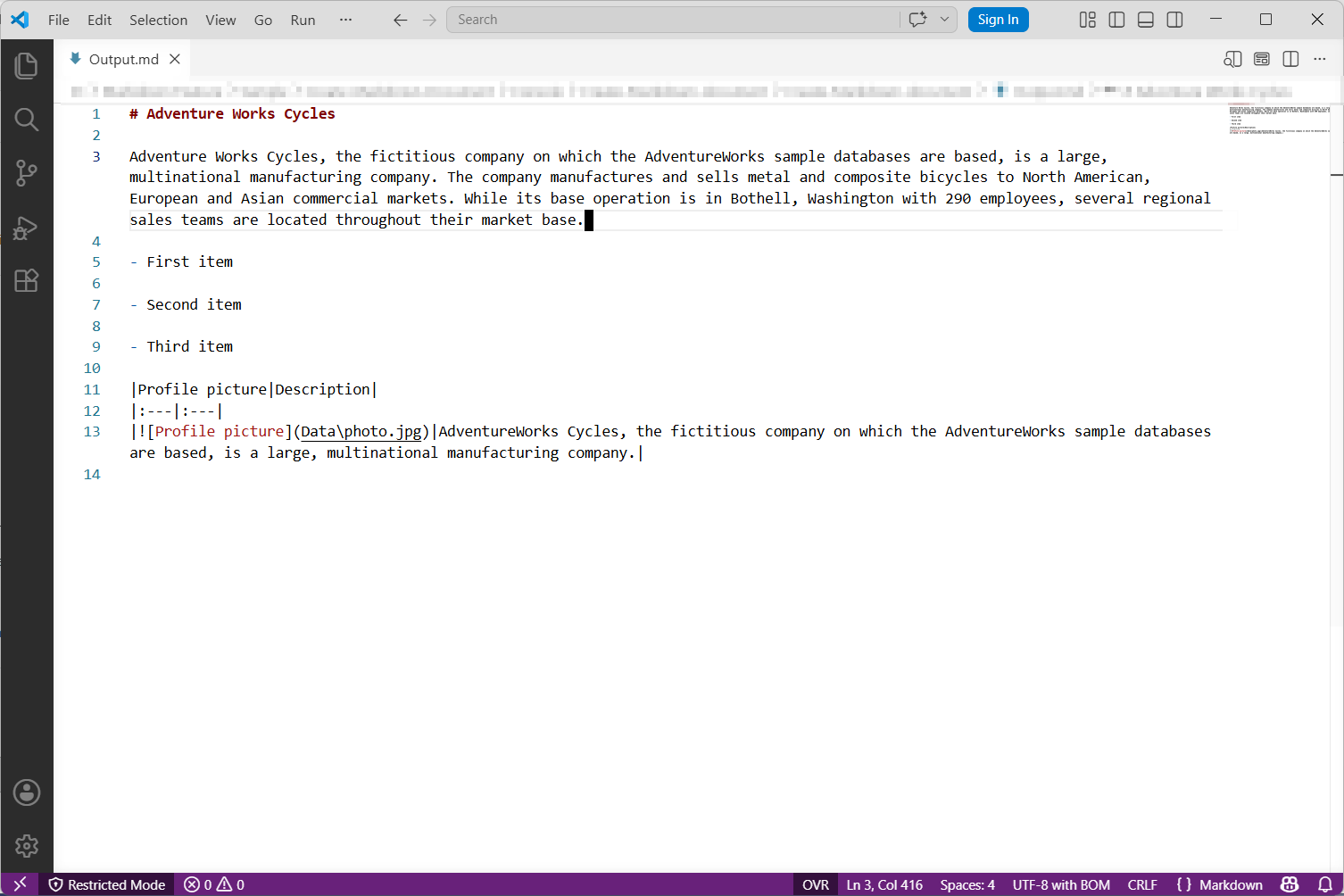
By executing the program, you will get the Markdown document as follows. The output will be saved alongside the Program.cs file.
Looking for the full .NET Markdown Library overview, features, pricing, and documentation? Visit the .NET Markdown Library page.
An online sample link to create a Markdown document in ASP.NET Core.