Rich Text Formatting in React Spreadsheet
23 Sep 202621 minutes to read
Rich text formatting allows you to apply different styles to specific portions of text within a single cell to improve readability and presentation. Each text segment can have its own formatting, enabling you to combine multiple styles within a single cell.
In the React Spreadsheet Editor component, rich text formatting is supported through the richText property of the cell model.
Each richText segment contains:
-
text– Specifies the content of the segment -
style– Defines formatting using theCellStyleModel
Rich text formatting supports the following style options through the style property of each richText segment:
Font Family
You can change the font family of individual rich text segments using the fontFamily property. This allows different portions of text within the same cell to be displayed using different typefaces such as Calibri, Arial, and Georgia.
Font Size
You can customize the size of individual rich text segments using the fontSize property to emphasize specific content within a cell.
Font Weight
You can apply font weight formatting using the fontWeight property. This is typically used to display specific text segments in bold.
Font Style
You can apply font style formatting using the fontStyle property. This property supports values such as normal and italic.
Text Decoration
You can apply text decorations to individual rich text segments using the textDecoration property. Supported decorations include underline and line-through.
Font Color
You can customize the color of specific text segments using the color property to improve visibility or highlight important information.
Subscript and Superscript
You can apply subscript and superscript formatting to individual text segments using the verticalAlign property.
- Use
verticalAlign: 'sub'to display text as subscript. - Use
verticalAlign: 'super'to display text as superscript.
How to Apply Rich Text Formatting
You can apply rich text formatting in following ways:
- Select the desired portion of text within a cell, then use the available formatting options in the ribbon such as font family, font size, bold, italic, underline, strikethrough, font color, subscript, or superscript.
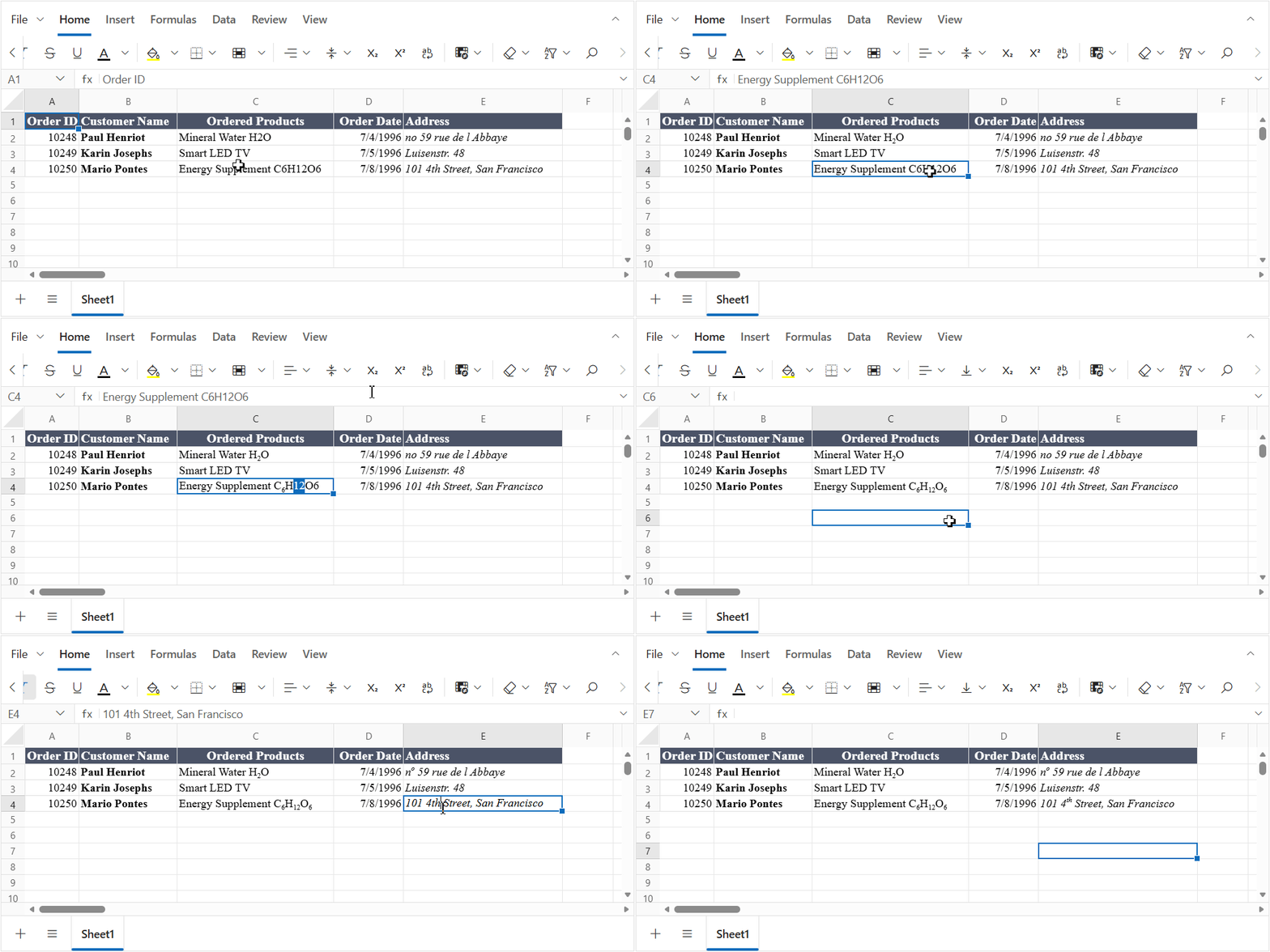
- You can define the
richTextproperty directly while initializing the Spreadsheet. This is useful when you want the formatting to be applied when the data is loaded.
    cells: [
        {
            value: 'Annual Sales Report 2026 Highlights (Draft)',
            richText: [
                { text: 'Annual Sales Report ', style: { fontWeight: 'bold' } },
                { text: '2026', style: { color: '#0078D4' } },
                { text: ' Highlights', style: { textDecoration: 'underline' } },
                { text: ' (Draft)', style: { fontStyle: 'italic' } }
            ]
        }
]- You can also apply formatting dynamically using the
updateCellmethod.
    spreadsheet.updateCell({
        richText: [
            { text: 'Premium Membership ', style: { fontWeight: 'bold', color: '#2E7D32' } },
            { text: 'valid until ', style: { fontStyle: 'italic' } },
            { text: '31', style: { textDecoration: 'underline' } },
            { text: 'st', style: { verticalAlign: 'super' } },
            { text: ' Dec 2026' }
        ]
    }, 'A5');
The following code example shows how to apply multiple rich text formats in cells of the Spreadsheet.
import * as React from 'react';
import { createRoot } from 'react-dom/client';
import { SpreadsheetComponent, SheetModel } from '@syncfusion/ej2-react-spreadsheet';

function App() {
    const spreadsheetRef = React.useRef(null);
    const sheets = [
        {
            columns: [{ width: 200 }],
            rows: [
                { cells: [{ value: 'Plain Text' }] },
                {
                    cells: [
                        {
                            value: 'Annual Sales Report 2026 (Draft)',
                            richText: [
                                { text: 'Annual Sales Report ', style: { fontWeight: 'bold' } },
                                { text: '2026', style: { color: '#0078D4' } },
                                { text: ' (Draft)', style: { fontStyle: 'italic' } }
                            ]
                        }
                    ]
                },
                {
                    cells: [
                        {
                            value: 'Customer Loyalty Program',
                            richText: [
                                { text: 'Customer Loyalty ', style: { textDecoration: 'underline' } },
                                { text: 'Program', style: { fontFamily: 'Georgia', fontSize: '14pt' } }
                            ]
                        }
                    ]
                },
                {
                    cells: [
                        {
                            value: 'Mineral Water H2O',
                            richText: [
                                { text: 'Mineral Water H' },
                                { text: '2', style: { verticalAlign: 'sub' } },
                                { text: 'O' }
                            ]
                        }
                    ]
                }
            ]
        }
    ];

    const onCreated = () => {
        const spreadsheet = spreadsheetRef.current;
        if (!spreadsheet) return;
        spreadsheet.updateCell({
        value: 'Premium Membership valid until 31st Dec 2026',
        richText: [
                { text: 'Premium Membership ', style: { fontWeight: 'bold', color: '#2E7D32' } },
                { text: 'valid until ', style: { fontStyle: 'italic' } },
                { text: '31', style: { textDecoration: 'underline' } },
                { text: 'st', style: { verticalAlign: 'super' } },
                { text: ' Dec 2026' }
            ]
        }, 'A5');
    };

    return (
        <div>
            <SpreadsheetComponent ref={spreadsheetRef} sheets={sheets} created={onCreated} >
            </SpreadsheetComponent>
        </div>
    );
}

export default App;

const root = createRoot(document.getElementById('root'));
root.render(<App />);
import * as React from 'react';
import { createRoot } from 'react-dom/client';
import { SpreadsheetComponent, SheetModel } from '@syncfusion/ej2-react-spreadsheet';
function App(): React.ReactElement {
const spreadsheetRef = React.useRef<SpreadsheetComponent>(null);
const sheets: SheetModel[] = [
{
columns: [{ width: 200 }],
rows: [
{ cells: [{ value: 'Plain Text' }] },
{
cells: [
{
value: 'Annual Sales Report 2026 (Draft)',
richText: [
{ text: 'Annual Sales Report ', style: { fontWeight: 'bold' } },
{ text: '2026', style: { color: '#0078D4' } },
{ text: ' (Draft)', style: { fontStyle: 'italic' } }
]
}
]
},
{
cells: [
{
value: 'Customer Loyalty Program',
richText: [
{ text: 'Customer Loyalty ', style: { textDecoration: 'underline' } },
{ text: 'Program', style: { fontFamily: 'Georgia', fontSize: '14pt' } }
]
}
]
},
{
cells: [
{
value: 'Mineral Water H2O',
richText: [
{ text: 'Mineral Water H' },
{ text: '2', style: { verticalAlign: 'sub' } },
{ text: 'O' }
]
}
]
}
]
}
];
const onCreated = (): void => {
const spreadsheet = spreadsheetRef.current;
if (!spreadsheet) return;
spreadsheet.updateCell({
value: 'Premium Membership valid until 31st Dec 2026',
richText: [
{ text: 'Premium Membership ', style: { fontWeight: 'bold', color: '#2E7D32' } },
{ text: 'valid until ', style: { fontStyle: 'italic' } },
{ text: '31', style: { textDecoration: 'underline' } },
{ text: 'st', style: { verticalAlign: 'super' } },
{ text: ' Dec 2026' }
]
}, 'A5');
};
return (
<div>
<SpreadsheetComponent ref={spreadsheetRef} sheets={sheets} created={onCreated} >
</SpreadsheetComponent>
</div>
);
}
export default App;
const root = createRoot(document.getElementById('root')!);
root.render(<App />);Limitations
- Edit mode requirement: Formatting can be applied only while the cell is in edit mode. Selecting text outside of edit mode does not support subscript or superscript formatting.