Getting Started with the JavaScript Spreadsheet
31 Aug 20267 minutes to read
This section explains how to create a JavaScript application and add the JavaScript Spreadsheet with the minimum required configuration.
Create a JavaScript application
Create a folder named spreadsheet-app with index.html and index.js files.
Your application structure should look like this:
spreadsheet-app/
├── index.html
├── index.js
Add Syncfusion® Spreadsheet resources
Add the required Syncfusion® Spreadsheet style and script references to the index.html file using one of the following methods:
To use local scripts and styles for the Syncfusion® Spreadsheet, follow these steps:
-
Download and install the Spreadsheet Editor SDK.
-
Create a
resourcesfolder in your application (for example,spreadsheet-app/resources). -
From the installed SDK location, copy the required packages from the following folder into the
resourcesfolder:
<Install path>/Syncfusion/Essential Studio/Spreadsheet Editor SDK/{VERSION}/Web (Essential JS 2)/JavaScript
- After copying the files, add the Spreadsheet and its dependent control style and script references at the end of the <head> section in the
index.htmlfile.
<!-- Spreadsheet dependency styles -->
<link href="resources/ej2-base/styles/tailwind3.css" rel="stylesheet" type="textcss" />
<link href="resources/ej2-inputs/styles/tailwind3.css" rel="stylesheet" type="textcss" />
<link href="resources/ej2-buttons/styles/tailwind3.css" rel="stylesheet" type="textcss" />
<link href="resources/ej2-splitbuttons/styles/tailwind3.css" rel="stylesheet"type="text/css" />
<link href="resources/ej2-lists/styles/tailwind3.css" rel="stylesheet" type="textcss" />
<link href="resources/ej2-navigations/styles/tailwind3.css" rel="stylesheet"type="text/css" />
<link href="resources/ej2-popups/styles/tailwind3.css" rel="stylesheet" type="textcss" />
<link href="resources/ej2-dropdowns/styles/tailwind3.css" rel="stylesheet" type="textcss" />
<link href="resources/ej2-grids/styles/tailwind3.css" rel="stylesheet" type="textcss" />
<!-- Spreadsheet styles -->
<link href="resources/ej2-spreadsheet/styles/tailwind3.css" rel="stylesheet"type="text/css" />
<!-- Spreadsheet dependency scripts -->
<script src="resources/ej2-base/dist/global/ej2-base.min.js" type="text/javascript"><script>
<script src="resources/ej2-buttons/dist/global/ej2-buttons.min.js" type="textjavascript"></script>
<script src="resources/ej2-popups/dist/global/ej2-popups.min.js" type="textjavascript"></script>
<script src="resources/ej2-splitbuttons/dist/global/ej2-splitbuttons.min.js"type="text/javascript"></script>
<script src="resources/ej2-inputs/dist/global/ej2-inputs.min.js" type="textjavascript"></script>
<script src="resources/ej2-lists/dist/global/ej2-lists.min.js" type="textjavascript"></script>
<script src="resources/ej2-data/dist/global/ej2-data.min.js" type="text/javascript"><script>
<script src="resources/ej2-dropdowns/dist/global/ej2-dropdowns.min.js" type="textjavascript"></script>
<script src="resources/ej2-navigations/dist/global/ej2-navigations.min.js" type="textjavascript"></script>
<script src="resources/ej2-excel-export/dist/global/ej2-excel-export.min.js"type="text/javascript"></script>
<script src="resources/ej2-pdf-export/dist/global/ej2-pdf-export.min.js" type="textjavascript"></script>
<script src="resources/ej2-calendars/dist/global/ej2-calendars.min.js" type="textjavascript"></script>
<script src="resources/ej2-compression/dist/global/ej2-compression.min.js" type="textjavascript"></script>
<script src="resources/ej2-file-utils/dist/global/ej2-file-utils.min.js" type="textjavascript"></script>
<script src="resources/ej2-grids/dist/global/ej2-grids.min.js" type="textjavascript"></script>
<script src="resources/ej2-svg-base/dist/global/ej2-svg-base.min.js" type="textjavascript"></script>
<script src="resources/ej2-charts/dist/global/ej2-charts.min.js" type="textjavascript"></script>
<!-- Spreadsheet scripts -->
<script src="resources/ej2-spreadsheet/dist/global/ej2-spreadsheet.min.js" type="textjavascript"></script>
Reference the scripts and styles directly from the CDN and add at the end of the <head> section in the index.html file.
Script: https://cdn.syncfusion.com/ej2/{VERSION}/{PACKAGE_NAME}/dist/global/{PACKAGE_NAME}.min.js
Style: https://cdn.syncfusion.com/ej2/{VERSION}/{PACKAGE_NAME}/styles/{THEME_NAME}.css
<!-- Spreadsheet dependency styles -->
<link href="https://cdn.syncfusion.com/ej2/33.2.3/ej2-base/styles/tailwind3.css"rel="stylesheet" type="text/css" />
<link href="https://cdn.syncfusion.com/ej2/33.2.3/ej2-inputs/styles/tailwind3.css"rel="stylesheet" type="text/css" />
<link href="https://cdn.syncfusion.com/ej2/33.2.3/ej2-buttons/styles/tailwind3.css"rel="stylesheet" type="text/css" />
<link href="https://cdn.syncfusion.com/ej2/33.2.3/ej2-splitbuttons/styles/tailwind3.css" rel="stylesheet" type="text/css" />
<link href="https://cdn.syncfusion.com/ej2/33.2.3/ej2-lists/styles/tailwind3.css"rel="stylesheet" type="text/css" />
<link href="https://cdn.syncfusion.com/ej2/33.2.3/ej2-navigations/styles/tailwind3.css" rel="stylesheet" type="text/css" />
<link href="https://cdn.syncfusion.com/ej2/33.2.3/ej2-popups/styles/tailwind3.css"rel="stylesheet" type="text/css" />
<link href="https://cdn.syncfusion.com/ej2/33.2.3/ej2-dropdowns/styles/tailwind3.css"rel="stylesheet" type="text/css" />
<link href="https://cdn.syncfusion.com/ej2/33.2.3/ej2-grids/styles/tailwind3.css"rel="stylesheet" type="text/css" />
<!-- Spreadsheet styles -->
<link href="https://cdn.syncfusion.com/ej2/33.2.3/ej2-spreadsheet/styles/tailwind3.css" rel="stylesheet" type="text/css" />
<!-- Spreadsheet dependency scripts -->
<script src="https://cdn.syncfusion.com/ej2/33.2.3/ej2-base/dist/global/ej2-base.min.js" type="text/javascript"></script>
<script src="https://cdn.syncfusion.com/ej2/33.2.3/ej2-buttons/dist/global/ej2-buttons.min.js" type="text/javascript"></script>
<script src="https://cdn.syncfusion.com/ej2/33.2.3/ej2-popups/dist/global/ej2-popups.min.js" type="text/javascript"></script>
<script src="https://cdn.syncfusion.com/ej2/33.2.3/ej2-splitbuttons/dist/global/ej2-splitbuttons.min.js" type="text/javascript"></script>
<script src="https://cdn.syncfusion.com/ej2/33.2.3/ej2-inputs/dist/global/ej2-inputs.min.js" type="text/javascript"></script>
<script src="https://cdn.syncfusion.com/ej2/33.2.3/ej2-lists/dist/global/ej2-lists.min.js" type="text/javascript"></script>
<script src="https://cdn.syncfusion.com/ej2/33.2.3/ej2-data/dist/global/ej2-data.min.js" type="text/javascript"></script>
<script src="https://cdn.syncfusion.com/ej2/33.2.3/ej2-dropdowns/dist/global/ej2-dropdowns.min.js" type="text/javascript"></script>
<script src="https://cdn.syncfusion.com/ej2/33.2.3/ej2-navigations/dist/global/ej2-navigations.min.js" type="text/javascript"></script>
<script src="https://cdn.syncfusion.com/ej2/33.2.3/ej2-excel-export/dist/global/ej2-excel-export.min.js" type="text/javascript"></script>
<script src="https://cdn.syncfusion.com/ej2/33.2.3/ej2-pdf-export/dist/global/ej2-pdf-export.min.js" type="text/javascript"></script>
<script src="https://cdn.syncfusion.com/ej2/33.2.3/ej2-calendars/dist/global/ej2-calendars.min.js" type="text/javascript"></script>
<script src="https://cdn.syncfusion.com/ej2/33.2.3/ej2-compression/dist/global/ej2-compression.min.js" type="text/javascript"></script>
<script src="https://cdn.syncfusion.com/ej2/33.2.3/ej2-file-utils/dist/global/ej2-file-utils.min.js" type="text/javascript"></script>
<script src="https://cdn.syncfusion.com/ej2/33.2.3/ej2-grids/dist/global/ej2-grids.min.js" type="text/javascript"></script>
<script src="https://cdn.syncfusion.com/ej2/33.2.3/ej2-svg-base/dist/global/ej2-svg-base.min.js" type="text/javascript"></script>
<script src="https://cdn.syncfusion.com/ej2/33.2.3/ej2-charts/dist/global/ej2-charts.min.js" type="text/javascript"></script>
<!-- Spreadsheet scripts -->
<script src="https://cdn.syncfusion.com/ej2/33.2.3/ej2-spreadsheet/dist/global/ej2-spreadsheet.min.js" type="text/javascript"></script>
Note: This example uses the
Tailwind3theme. To use a different built-in theme, replace thetailwind3.cssreferences with the corresponding theme stylesheets. Refer to the Themes documentation for information about the available themes and the different ways to include theme styles in a JavaScript application. To generate customized resources, refer to the CRG documentation.
Register Syncfusion License Key
Before initializing any Syncfusion components, generate a Syncfusion license key and register it in the application.
Add the Syncfusion® Spreadsheet Editor
Add a container element for the Spreadsheet control in the index.html file and then initialize the control in the index.js file.
<!DOCTYPE html>
<html xmlns="http://www.w3.org/1999/xhtml">
<head>
    <title>Syncfusion JavaScript Spreadsheet</title>
    <!-- Add your style references here -->
</head>
<body>
    <!-- Element which will render as Spreadsheet -->
    <div id="element"></div>
    <script src="index.js" type="text/javascript"></script>
</body>
</html>
// Initialize the Spreadsheet Editor
var spreadsheet = new ej.spreadsheet.Spreadsheet({
openUrl: 'https://document.syncfusion.com/web-services/spreadsheet-editor/api/spreadsheet/open',
saveUrl: 'https://document.syncfusion.com/web-services/spreadsheet-editor/api/spreadsheet/save'
});
// Render the Spreadsheet Editor
spreadsheet.appendTo('#element');Note: The openUrl and saveUrl properties are used to connect the Spreadsheet control to a server-side service for Excel import and export operations. For development and production use, we recommend configuring your own local or hosted service instead of relying on demo endpoints. For more information, refer to the
link.
Run the application
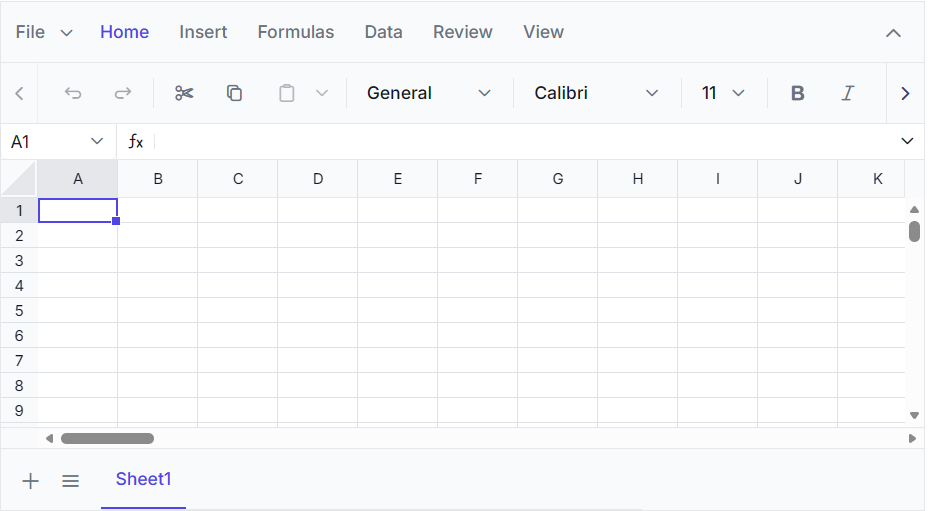
Open the index.html file in a web browser to launch the JavaScript Spreadsheet Editor. Verify that the Spreadsheet Editor is rendered correctly, as shown in the following image.
You can also explore the Spreadsheet Editor using the live sample below. The sample allows you to load an Excel file, analyze and modify its data, and save the updated data back to an Excel file.
For information about features, pricing, and related resources, visit the JavaScript Spreadsheet Editor page.