Print in ASP.NET Core Spreadsheet
14 Aug 202616 minutes to read
The printing functionality allows end-users to print all contents, such as tables, charts, images, and formatted contents, available in the active worksheet or entire workbook in the Spreadsheet. You can enable or disable print functionality by using the allowPrint property, which defaults to true.
Default printing
To print the active worksheet:
- Ensure that the spreadsheet is in focus.
- Open the File menu in the ribbon and choose Print. Alternatively, press
Ctrl + P. - Review the active worksheet in the browser’s print dialog.
- Select the printer and configure the available browser print settings.
- Start the print operation.
By default, only data from the active worksheet is printed. Row headers, column headers, and gridlines are excluded.

Custom printing
Use the print method to print the active worksheet or the entire workbook with customized options. The method accepts a printOptions object containing the following properties:
| Property | Description |
|---|---|
type |
Specifies whether to print the active worksheet or the entire workbook. The supported values are ActiveSheet and Workbook. |
allowGridLines |
Specifies whether gridlines are included in the printed output. Set this property to true to include gridlines or false to exclude them. |
allowRowColumnHeader |
Specifies whether row and column headers are included in the printed output. Set this property to true to include the headers or false to exclude them. |
When the
<ejs-dropdownbutton id="element" content="Print" items="ViewBag.items" select="itemSelect"></ejs-dropdownbutton>
<input type="checkbox" id="gridline" /><label for="gridline">Allow Grid Lines</label>
<input type="checkbox" id="header" /><label for="header">Allow Row Column Header </label>
<ejs-spreadsheet id="spreadsheet" openUrl="Open" allowOpen="true" saveUrl="Save" allowSave="true" created="created">
    <e-spreadsheet-sheets>
        <e-spreadsheet-sheet name="Budget">
            <e-spreadsheet-ranges>
                <e-spreadsheet-range dataSource="ViewBag.budgetData"></e-spreadsheet-range>
            </e-spreadsheet-ranges>
            <e-spreadsheet-columns>
                <e-spreadsheet-column width="100"></e-spreadsheet-column>
                <e-spreadsheet-column width="100"></e-spreadsheet-column>
                <e-spreadsheet-column width="100"></e-spreadsheet-column>
                <e-spreadsheet-column width="100"></e-spreadsheet-column>
            </e-spreadsheet-columns>
        </e-spreadsheet-sheet>
        <e-spreadsheet-sheet name="Salary">
            <e-spreadsheet-ranges>
                <e-spreadsheet-range dataSource="ViewBag.salaryData"></e-spreadsheet-range>
            </e-spreadsheet-ranges>
            <e-spreadsheet-columns>
                <e-spreadsheet-column width="100"></e-spreadsheet-column>
                <e-spreadsheet-column width="100"></e-spreadsheet-column>
                <e-spreadsheet-column width="100"></e-spreadsheet-column>
                <e-spreadsheet-column width="100"></e-spreadsheet-column>
            </e-spreadsheet-columns>
        </e-spreadsheet-sheet>
    </e-spreadsheet-sheets>
</ejs-spreadsheet>


<script>

    function created() {
        this.cellFormat({ fontWeight: 'bold', textAlign: 'center' }, 'A1:D1');
        this.cellFormat({ fontWeight: 'bold' }, 'A11:D11');
    }

    function itemSelect(args) {
        var spreadsheetObj = document.getElementById("spreadsheet").ej2_instances[0];
        if (spreadsheetObj) {
            const allowGridLines = document.getElementById('gridline');
            const allowRowColumnHeader = document.getElementById('header');
            spreadsheetObj.print({
                type: args.item.text,
                allowGridLines: allowGridLines.checked,
                allowRowColumnHeader: allowRowColumnHeader.checked
            });
        }
    }

</script>
public IActionResult Open(IFormCollection openRequest)
{
OpenRequest open = new OpenRequest();
open.File = openRequest.Files[0];
return Content(Workbook.Open(open));
}
public IActionResult Save(SaveSettings saveSettings)
{
return Workbook.Save(saveSettings);
}
public IActionResult Index()
{
List<object> data1 = new List<object>()
{
new { ExpenseType= "Housing", ProjectedCost= "7000", ActualCost= "7500", Difference= "-500"},
new { ExpenseType= "Transportation", ProjectedCost= "500", ActualCost= "500", Difference= "0"},
new { ExpenseType= "Insurance", ProjectedCost= "1000", ActualCost= "1000", Difference= "0"},
new { ExpenseType= "Food", ProjectedCost= "2000", ActualCost= "1800", Difference= "200"},
new { ExpenseType= "Pets", ProjectedCost= "300", ActualCost= "200", Difference= "100"},
new { ExpenseType= "Personel Care", ProjectedCost= "500", ActualCost= "500", Difference= "0"},
new { ExpenseType= "Loan", ProjectedCost= "1000", ActualCost= "1000", Difference= "0"},
new { ExpenseType= "Tax", ProjectedCost= "200", ActualCost= "200", Difference= "0"},
new { ExpenseType= "Savings", ProjectedCost= "1000", ActualCost= "900", Difference= "100"},
new { ExpenseType= "Total", ProjectedCost= "13500", ActualCost= "13600", Difference= "-100"},
};
List<object> data2 = new List<object>()
{
new { Earnings= "Basic", CreditAmount= "20000", Deductions= "Provident Fund", DebitAmount= "2400"},
new { Earnings= "HRA", CreditAmount= "8000", Deductions= "ESI", DebitAmount= "0"},
new { Earnings= "Special Allowance", CreditAmount= "25000", Deductions= "Professional Tax", DebitAmount= "200"},
new { Earnings= "Incentives", CreditAmount= "2000", Deductions= "TDS", DebitAmount= "2750"},
new { Earnings= "Bonus", CreditAmount= "1500", Deductions= "Other Deduction", DebitAmount= "0"},
new { Earnings= "Total Earnings", CreditAmount= "56500", Deductions= "Total Deductions", DebitAmount= "5350"},
};
List<object> items = new List<object>();
items.Add(new { text = "ActiveSheet" });
items.Add(new { text = "Workbook" });
ViewBag.budgetData = data1;
ViewBag.salaryData = data2;
ViewBag.items = items;
return View();
}Disable printing
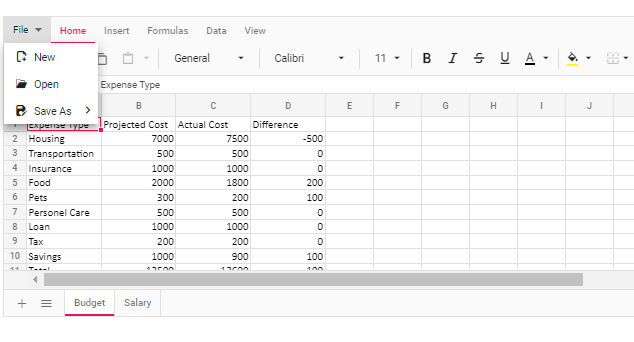
Set the allowPrint property to false to disable printing. When printing is disabled:
- The Print option is not displayed in the File menu.
- The Spreadsheet print keyboard shortcut is unavailable.
<ejs-spreadsheet id="spreadsheet" openUrl="Open" allowOpen="true" saveUrl="Save" allowSave="true" allowPrint="false" dataBound="dataBound">
    <e-spreadsheet-sheets>
        <e-spreadsheet-sheet name="Budget">
            <e-spreadsheet-ranges>
                <e-spreadsheet-range dataSource="ViewBag.budgetData"></e-spreadsheet-range>
            </e-spreadsheet-ranges>
            <e-spreadsheet-columns>
                <e-spreadsheet-column width="100"></e-spreadsheet-column>
                <e-spreadsheet-column width="100"></e-spreadsheet-column>
                <e-spreadsheet-column width="100"></e-spreadsheet-column>
                <e-spreadsheet-column width="100"></e-spreadsheet-column>
            </e-spreadsheet-columns>
        </e-spreadsheet-sheet>
        <e-spreadsheet-sheet name="Salary">
            <e-spreadsheet-ranges>
                <e-spreadsheet-range dataSource="ViewBag.salaryData"></e-spreadsheet-range>
            </e-spreadsheet-ranges>
            <e-spreadsheet-columns>
                <e-spreadsheet-column width="100"></e-spreadsheet-column>
                <e-spreadsheet-column width="100"></e-spreadsheet-column>
                <e-spreadsheet-column width="100"></e-spreadsheet-column>
                <e-spreadsheet-column width="100"></e-spreadsheet-column>
            </e-spreadsheet-columns>
        </e-spreadsheet-sheet>
    </e-spreadsheet-sheets>
</ejs-spreadsheet>


<script>

  function dataBound() {
    this.cellFormat({ fontWeight: 'bold', textAlign: 'center' }, 'A1:D1');
    this.cellFormat({ fontWeight: 'bold'}, 'A11:D11');
}

</script>
public IActionResult Open(IFormCollection openRequest)
{
OpenRequest open = new OpenRequest();
open.File = openRequest.Files[0];
return Content(Workbook.Open(open));
}
public IActionResult Save(SaveSettings saveSettings)
{
return Workbook.Save(saveSettings);
}
public IActionResult Index()
{
List<object> data1 = new List<object>()
{
new { ExpenseType= "Housing", ProjectedCost= "7000", ActualCost= "7500", Difference= "-500"},
new { ExpenseType= "Transportation", ProjectedCost= "500", ActualCost= "500", Difference= "0"},
new { ExpenseType= "Insurance", ProjectedCost= "1000", ActualCost= "1000", Difference= "0"},
new { ExpenseType= "Food", ProjectedCost= "2000", ActualCost= "1800", Difference= "200"},
new { ExpenseType= "Pets", ProjectedCost= "300", ActualCost= "200", Difference= "100"},
new { ExpenseType= "Personel Care", ProjectedCost= "500", ActualCost= "500", Difference= "0"},
new { ExpenseType= "Loan", ProjectedCost= "1000", ActualCost= "1000", Difference= "0"},
new { ExpenseType= "Tax", ProjectedCost= "200", ActualCost= "200", Difference= "0"},
new { ExpenseType= "Savings", ProjectedCost= "1000", ActualCost= "900", Difference= "100"},
new { ExpenseType= "Total", ProjectedCost= "13500", ActualCost= "13600", Difference= "-100"},
};
List<object> data2 = new List<object>()
{
new { Earnings= "Basic", CreditAmount= "20000", Deductions= "Provident Fund", DebitAmount= "2400"},
new { Earnings= "HRA", CreditAmount= "8000", Deductions= "ESI", DebitAmount= "0"},
new { Earnings= "Special Allowance", CreditAmount= "25000", Deductions= "Professional Tax", DebitAmount= "200"},
new { Earnings= "Incentives", CreditAmount= "2000", Deductions= "TDS", DebitAmount= "2750"},
new { Earnings= "Bonus", CreditAmount= "1500", Deductions= "Other Deduction", DebitAmount= "0"},
new { Earnings= "Total Earnings", CreditAmount= "56500", Deductions= "Total Deductions", DebitAmount= "5350"},
};
ViewBag.budgetData = data1;
ViewBag.salaryData = data2;
return View();
}Limitations
- Changing the page orientation to landscape is not supported by the
printmethod or through the browser’s print preview dialog. - The styles provided for the data validation functionality will not be available in the printed copy of the document.
- The content added to the cell templates, such as HTML elements, Syncfusion® controls, and others, will not be available in the printed copy of the document.