Getting Started with ASP.NET Core Spreadsheet
14 Aug 20263 minutes to read
This section briefly explains how to include ASP.NET Core Spreadsheet Editor control in your ASP.NET Core application using Visual Studio.
Prerequisites
System requirements for ASP.NET Core controls
Create ASP.NET Core web application with Razor pages
Install Syncfusion® ASP.NET Core package in the application
Open the NuGet package manager UI in Visual Studio (Tools → NuGet Package Manager → Manage NuGet Packages for Solution), search for Syncfusion.EJ2.AspNet.Core and then install it. Alternatively, you can utilize the following package manager command to achieve the same.
Install-Package Syncfusion.EJ2.AspNet.Core -Version 35.1.37ASP.NET Core controls are available in nuget.org. Refer to NuGet packages topic to learn more about installing NuGet packages in various OS environments.
Add Syncfusion® ASP.NET Core Tag Helper
Open ~/Pages/_ViewImports.cshtml file and import the Syncfusion.EJ2 tag helper.
@addTagHelper *, Syncfusion.EJ2Register a Syncfusion License Key
Before initializing the Syncfusion ASP.NET Core Spreadsheet control, generate a Syncfusion license key and register it in your application.
Add stylesheet and script resources
Add the stylesheet and script references at the end of the <head> section in the ~/Pages/Shared/_Layout.cshtml file, as shown in the following example.
<!-- Syncfusion ASP.NET Core controls styles -->
<link rel="stylesheet" href="https://cdn.syncfusion.com/ej2/35.1.37/fluent.css" />

<!-- Syncfusion ASP.NET Core controls scripts -->
<script src="https://cdn.syncfusion.com/ej2/35.1.37/dist/ej2.min.js"></script>
To use a different theme, replace fluent.css with the theme of your choice (for example, tailwind3.css, bootstrap5.css, etc.) in the above code.
To learn other ways to load themes or scripts (such as NPM packages or CRG), see the Themes topic and Adding Script Reference documentation.
Register Syncfusion® Script Manager
Register the script manager <ejs-scripts> at the end of the <body> section in the ASP.NET Core application, as shown in the following example.
<!-- Syncfusion ASP.NET Core Script Manager -->
<ejs-scripts></ejs-scripts>
Add ASP.NET Core Spreadsheet Control
Add the ASP.NET Core Spreadsheet tag helper in ~/Pages/Index.cshtml page.
@page

<ejs-spreadsheet id="spreadsheet" openUrl="https://document.syncfusion.com/web-services/spreadsheet-editor/api/spreadsheet/open" saveUrl="https://document.syncfusion.com/web-services/spreadsheet-editor/api/spreadsheet/save"></ejs-spreadsheet>
Note: The
openUrlandsaveUrlendpoints used in this example are provided only for demonstration purposes. For development and production use, we strongly recommend configuring your own local or hosted web service for the Open and Save actions instead of relying on the online demo service. For more information, refer to theOpen and Savesection.
Press Ctrl+F5 (Windows) or ⌘+F5 (macOS) to run the app. Then, the ASP.NET Core Spreadsheet control will be rendered in the default web browser.
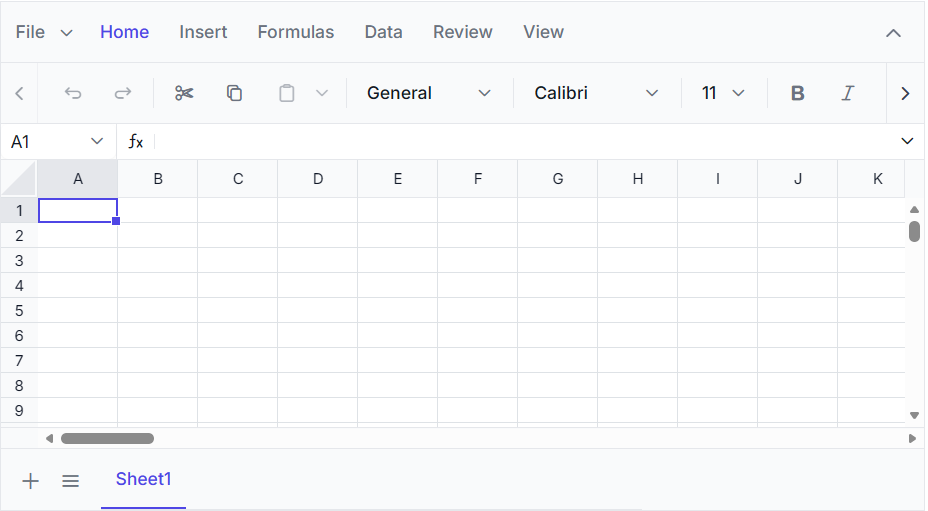
View Sample in GitHub. Looking for the full ASP.NET Core Spreadsheet component overview, features, pricing, and documentation? Visit the ASP.NET Core Spreadsheet Editor page.
Troubleshooting
If the Spreadsheet control does not render as expected, use the following checklist to resolve the most common setup and configuration issues.
1. Control not rendering (blank area where the Spreadsheet should appear)
- Ensure the
<ejs-scripts>tag is included at the end of<body>section in~/Pages/Shared/_Layout.cshtmlto initialize client-side scripts.
2. Tag helper not recognized (ejs-spreadsheet shows as plain text)
- Ensure
@addTagHelper *, Syncfusion.EJ2is included in~/Pages/_ViewImports.cshtml. - Rebuild the project after installing the
Syncfusion.EJ2.AspNet.CoreNuGet package.
3. Open/Save requests fail
- The sample uses the online demo service for
openUrlandsaveUrl. For local development, configure your own backend service. Refer to Open and Save for setup details.