Padding in Windows Forms XPTaskBar
18 Nov 20181 minute to read
Padding settings for XPTaskBar
The interior spacing of the XPTaskBar control can be specified by setting the DockPadding property to integer values.
The horizontal and vertical padding can be specified using the HorizontalPadding and VerticalPadding properties. The default value of both is zero (in pixels).
this.xpTaskBar1.DockPadding.All = 10;
this.xpTaskBar1.HorizontalPadding = 3;
this.xpTaskBar1.VerticalPadding = 3;Me.xpTaskBar1.DockPadding.All = 10
Me.xpTaskBar1.HorizontalPadding = 3
Me.xpTaskBar1.VerticalPadding = 3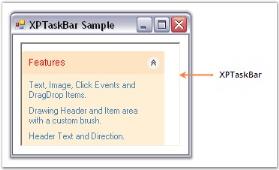
Padding settings for XPTaskBar box header
Padding provides spacing between the text of the header and its borders. Horizontal and vertical padding can be set using the PADX and PADY properties. Values are in pixels.
this.xpTaskBarBox1.PADX = 7;
this.xpTaskBarBox1.PADY = 7;Me.xpTaskBarBox1.PADX = 7
Me.xpTaskBarBox1.PADY = 7The following figure displays the XPTaskBar Box with padding settings.