Border Settings in Windows Forms NumericUpdown
18 Nov 20181 minute to read
This section discusses the Border Settings of the NumericUpdown control.
Color and Styles can be applied to the border of the NumericUpdown control as discussed below.
| NumericUpdown Properties | Description |
|---|---|
| Border3DStyle |
Indicates the style of the 3D border. The options included are as follows: RaisedOuter, SunkenOuter, RaisedInner, SunkenInner, Raised, Etched, Bump, Sunken, Adjust and Flat. The default value is set to 'Sunken'. |
| BorderColor | Specifies the color of the 2D border. |
| BorderSides |
Indicates the border sides of the panel. The options included are as follows: Left, Top, Right, Bottom, Middle and All. |
| BorderStyle |
Indicates whether the edit control should have a border. The options included are given below: FixedSingle, Fixed3D and None. |
this.numericUpDownExt1.Border3DStyle = System.Windows.Forms.Border3DStyle.Etched;
this.numericUpDownExt1.BorderColor = System.Drawing.Color.Crimson;
this.numericUpDownExt1.BorderSides = System.Windows.Forms.Border3DSide.All;
this.numericUpDownExt1.BorderStyle = System.Windows.Forms.BorderStyle.FixedSingle;Me.numericUpDownExt1.Border3DStyle = System.Windows.Forms.Border3DStyle.Etched
Me.numericUpDownExt1.BorderColor = System.Drawing.Color.Crimson
Me.numericUpDownExt1.BorderSides = System.Windows.Forms.Border3DSide.All
Me.numericUpDownExt1.BorderStyle = System.Windows.Forms.BorderStyle.FixedSingle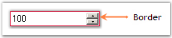
We can display a themed border around the NumericUpdown control. This can be done using the property given below.
| NumericUpdown Property | Description |
|---|---|
| ThemedBorder | Specifies whether or not you want themed border around the control when themes are enabled.The ThemesEnabled property must be set to 'True'. |
Refer Themes and Visual Styles topic to know about the ThemesEnabled property.
this.numericUpDownExt1.ThemedBorder = true;
this.numericUpDownExt1.ThemesEnabled = true;Me.numericUpDownExt1.ThemedBorder = True
Me.numericUpDownExt1.ThemesEnabled = True