Printing in WinForms HTML Viewer control
18 Nov 20182 minutes to read
The WinForms HTML Viewer control supports printing that helps the user in developing a hard copy of the document displayed in it. Also the Print Preview feature lets the user to preview the page before being printed, and change the page according to the requirements.
//Document initialization

HTMLUIPrintDocument pd = new HTMLUIPrintDocument(this.htmluiControl1.Document);


//Print Preview

PrintPreviewDialog dlg = new PrintPreviewDialog();

dlg.Document = pd;

dlg.ShowDialog();


//Print

PrintDialog dialog = new PrintDialog();

dialog.AllowSomePages = true;

dialog.Document = pd;

if (dialog.ShowDialog() == DialogResult.OK)

pd.Print();
'Document initialization
Dim pd As New HTMLUIPrintDocument(Me.HtmluiControl1.Document)
'Print Preview
Dim dlg As New PrintPreviewDialog()
dlg.Document = pd
dlg.ShowDialog()
'Print
Dim dialog As New PrintDialog()
dialog.AllowSomePages = True
dialog.Document = pd
If dialog.ShowDialog() = DialogResult.OK Then
pd.Print()
End IfAlong with printing feature, WinForms HTML Viewer control supports previewing of the document before printing. This following code snippet shows how the print preview feature is enabled in the control.
// Document Initialization

private void PrintPreViewButton_Click(object sender, System.EventArgs e)

{

  HTMLUIPrintDocument pd = new HTMLUIPrintDocument(this.htmluiControl1.Document);


  // Initialize the new instance of the System.Window.Forms.PrintPreviewDialog Class

  PrintPreviewDialog dlg = new PrintPreviewDialog() ;

  dlg.Document = pd;

  dlg.ShowDialog();

}
' Document Initialization
Private Sub PrintPreViewButton_Click(ByVal sender As Object, ByVal e As System.EventArgs)
Dim pd As HTMLUIPrintDocument = New HTMLUIPrintDocument(Me.htmluiControl1.Document)
' Initialize the new instance of the System.Window.Forms.PrintPreviewDialog Class
Dim dlg As PrintPreviewDialog = New PrintPreviewDialog()
dlg.Document = pd
dlg.ShowDialog()
End SubThe following figure shows the Print preview page that appears when the corresponding button is clicked. This illustrates the Printing feature in WinForms HTML Viewer.
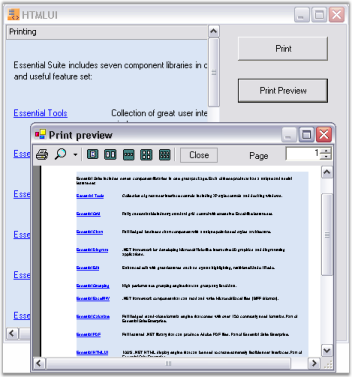
WinForms HTML Viewer Printing sample
This sample shows how an HTML document available in the WinForms HTML Viewer can be printed.
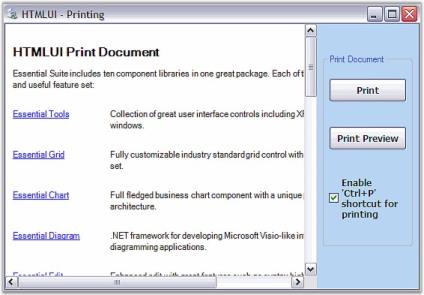
By default, this sample can be found under the following location:
…_My Documents\Syncfusion\EssentialStudio\Version Number\Windows\HTMLUI.Windows\Samples\Advanced Editor Functions\ActionGroupingDemo_