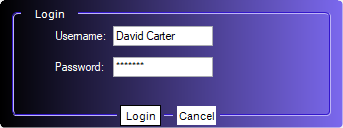
Getting Started with Windows Forms GradientPanelExt
18 Nov 201818 minutes to read
This section explains how to get started with the Windows Forms GradientPanelExt control and its basic features.
Assembly Deployment
Refer to the Control Dependencies section for the list of assemblies and NuGet packages required to use the GradientPanelExt control.
Refer to NuGet Packages to learn how to install NuGet packages in a Windows Forms application.
To install the required NuGet package using the NuGet Package Manager Console, run the following command:
To install via the NuGet Package Manager Console, run:
Install-Package Syncfusion.Shared.BaseAdding GradientPanelExt Control via Designer
-
Create a new Windows Forms project in Visual Studio.
-
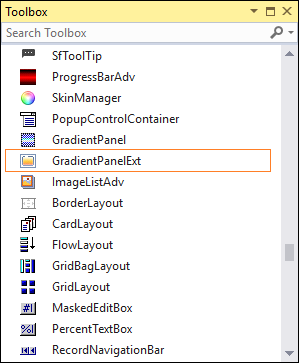
Install the required Syncfusion WinForms NuGet package. After the control is registered in the Toolbox, drag the GradientPanelExt control onto the Windows Form designer. The following dependent assembly is added automatically:
- Syncfusion.Shared.Base
-
Configure the control using the Properties window. For example:
- Set the
BackgroundColorproperty to aSyncfusion.Drawing.BrushInfovalue with the desired gradient style. - Set the
BorderColorandBorderStyleproperties to customize the border. - Set the
CornerRadiusproperty to create rounded corners.
- Set the
-
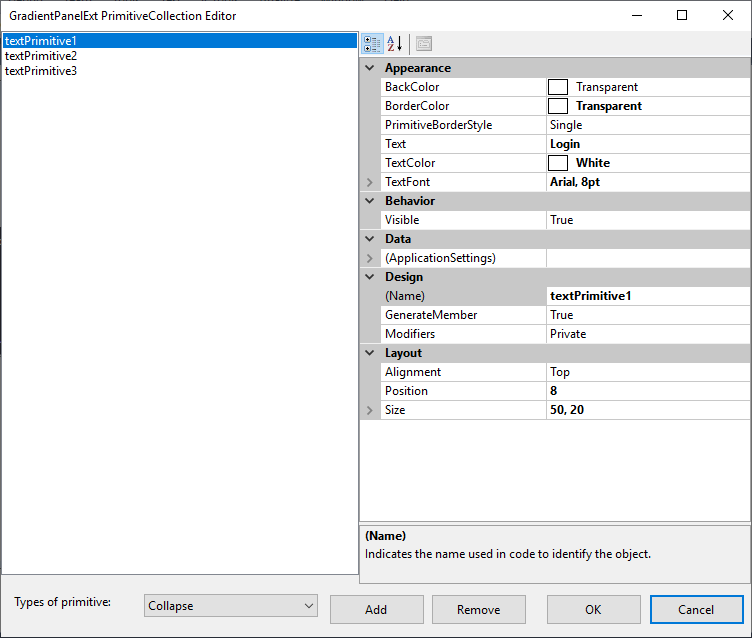
Add primitives using the GradientPanelExt Primitive Collection Editor, which can be accessed through the
Primitivesproperty. Select a primitive type (Collapse,Image,Text, orHost) and configure its alignment, position, and size in the Properties window.
- Build and run the application.
Adding GradientPanelExt Control via Code
The following steps describe how to create the GradientPanelExt control programmatically:
-
Create a C# or VB.NET Windows Forms application in Visual Studio.
-
Add the following assembly reference to the project:
- Syncfusion.Shared.Base
-
Include the required namespaces at the top of the file.
using Syncfusion.Windows.Forms.Tools;
using Syncfusion.Drawing;
using System.Drawing;
using System.Windows.Forms;
Imports Syncfusion.Windows.Forms.Tools Imports Syncfusion.Drawing Imports System.Drawing Imports System.Windows.Forms -
Create an instance of the GradientPanelExt control and add it to the form.
GradientPanelExt gradientPanelExt = new GradientPanelExt();
this.Controls.Add(gradientPanelExt);
Dim gradientPanelExt As New GradientPanelExt() Me.Controls.Add(gradientPanelExt) -
Configure the control properties and add the required primitives. Place the following code inside the
Form1class.public partial class Form1 : Form { private Syncfusion.Windows.Forms.Tools.GradientPanelExt gradientPanelExt; public Form1() { InitializeComponent(); // GradientPanelExt gradientPanelExt = new Syncfusion.Windows.Forms.Tools.GradientPanelExt(); gradientPanelExt.Name = "gradientPanelExt"; gradientPanelExt.Size = new System.Drawing.Size(343, 128); gradientPanelExt.Location = new System.Drawing.Point(20, 20); gradientPanelExt.BackColor = System.Drawing.Color.Transparent; gradientPanelExt.BackgroundColor = new Syncfusion.Drawing.BrushInfo( Syncfusion.Drawing.GradientStyle.Horizontal, System.Drawing.Color.MediumSlateBlue, System.Drawing.Color.Lavender); gradientPanelExt.CornerRadius = 10; this.Controls.Add(gradientPanelExt); // Username Label Label label1 = new Label(); label1.Location = new System.Drawing.Point(52, 29); label1.BackColor = System.Drawing.Color.Transparent; label1.ForeColor = System.Drawing.Color.White; label1.Size = new System.Drawing.Size(58, 13); label1.Text = "Username:"; // Password Label Label label2 = new Label(); label2.Location = new System.Drawing.Point(52, 60); label2.BackColor = System.Drawing.Color.Transparent; label2.ForeColor = System.Drawing.Color.White; label2.Size = new System.Drawing.Size(58, 13); label2.Text = "Password:"; // Username TextBoxExt TextBoxExt textBoxExt1 = new TextBoxExt(); textBoxExt1.Location = new System.Drawing.Point(113, 26); textBoxExt1.Size = new System.Drawing.Size(100, 20); textBoxExt1.Text = "David carter"; // Password TextBoxExt TextBoxExt textBoxExt2 = new TextBoxExt(); textBoxExt2.Location = new System.Drawing.Point(113, 57); textBoxExt2.PasswordChar = '*'; textBoxExt2.Size = new System.Drawing.Size(100, 20); textBoxExt2.Text = "Welcome"; // Login title primitive TextPrimitive textPrimitive1 = new TextPrimitive(); textPrimitive1.Text = "Login"; textPrimitive1.TextColor = System.Drawing.Color.White; textPrimitive1.Alignment = Syncfusion.Windows.Forms.Tools.Alignment.Top; textPrimitive1.BorderColor = System.Drawing.Color.Transparent; textPrimitive1.Size = new System.Drawing.Size(50, 20); // Ok button primitive TextPrimitive textPrimitive2 = new TextPrimitive(); textPrimitive2.Text = "Ok"; textPrimitive2.BackColor = System.Drawing.Color.White; textPrimitive2.TextColor = System.Drawing.Color.Black; textPrimitive2.Alignment = Syncfusion.Windows.Forms.Tools.Alignment.Bottom; textPrimitive2.BorderColor = System.Drawing.Color.Transparent; textPrimitive2.Position = 104; textPrimitive2.Size = new System.Drawing.Size(40, 20); // Cancel button primitive TextPrimitive textPrimitive3 = new TextPrimitive(); textPrimitive3.Text = "Cancel"; textPrimitive3.BackColor = System.Drawing.Color.White; textPrimitive3.TextColor = System.Drawing.Color.Black; textPrimitive3.Alignment = Syncfusion.Windows.Forms.Tools.Alignment.Bottom; textPrimitive3.BorderColor = System.Drawing.Color.Transparent; textPrimitive3.Position = 160; textPrimitive3.Size = new System.Drawing.Size(40, 20); // Add primitives to the panel gradientPanelExt.Primitives.AddRange(new Syncfusion.Windows.Forms.Tools.Primitive[] { textPrimitive1, textPrimitive2, textPrimitive3 }); // Add child labels to the panel gradientPanelExt.Controls.Add(label1); gradientPanelExt.Controls.Add(label2); gradientPanelExt.Controls.Add(textBoxExt1); gradientPanelExt.Controls.Add(textBoxExt2); } }Public Partial Class Form1 Inherits Form Private WithEvents gradientPanelExt As Syncfusion.Windows.Forms.Tools.GradientPanelExt Public Sub New() InitializeComponent() ' GradientPanelExt gradientPanelExt = New Syncfusion.Windows.Forms.Tools.GradientPanelExt() gradientPanelExt.Name = "gradientPanelExt" gradientPanelExt.Size = New System.Drawing.Size(343, 128) gradientPanelExt.Location = New System.Drawing.Point(20, 20) gradientPanelExt.BackColor = System.Drawing.Color.Transparent gradientPanelExt.BackgroundColor = New Syncfusion.Drawing.BrushInfo( Syncfusion.Drawing.GradientStyle.Horizontal, System.Drawing.Color.MediumSlateBlue, System.Drawing.Color.Lavender) gradientPanelExt.CornerRadius = 10 Me.Controls.Add(gradientPanelExt) ' Username Label Dim label1 As New Label() label1.Location = New System.Drawing.Point(52, 29) label1.BackColor = System.Drawing.Color.Transparent label1.ForeColor = System.Drawing.Color.White label1.Size = New System.Drawing.Size(58, 13) label1.Text = "Username:" ' Password Label Dim label2 As New Label() label2.Location = New System.Drawing.Point(52, 60) label2.BackColor = System.Drawing.Color.Transparent label2.ForeColor = System.Drawing.Color.White label2.Size = New System.Drawing.Size(58, 13) label2.Text = "Password:" ' Username TextBoxExt Dim textBoxExt1 As New TextBoxExt() textBoxExt1.Location = New System.Drawing.Point(113, 26) textBoxExt1.Size = New System.Drawing.Size(100, 20) textBoxExt1.Text = "David carter" ' Password TextBoxExt Dim textBoxExt2 As New TextBoxExt() textBoxExt2.Location = New System.Drawing.Point(113, 57) textBoxExt2.PasswordChar = "*"c textBoxExt2.Size = New System.Drawing.Size(100, 20) textBoxExt2.Text = "Welcome" ' Login title primitive Dim textPrimitive1 As New TextPrimitive() textPrimitive1.Text = "Login" textPrimitive1.TextColor = System.Drawing.Color.White textPrimitive1.Alignment = Syncfusion.Windows.Forms.Tools.Alignment.Top textPrimitive1.BorderColor = System.Drawing.Color.Transparent textPrimitive1.Size = New System.Drawing.Size(50, 20) ' Ok button primitive Dim textPrimitive2 As New TextPrimitive() textPrimitive2.Text = "Ok" textPrimitive2.BackColor = System.Drawing.Color.White textPrimitive2.TextColor = System.Drawing.Color.Black textPrimitive2.Alignment = Syncfusion.Windows.Forms.Tools.Alignment.Bottom textPrimitive2.BorderColor = System.Drawing.Color.Transparent textPrimitive2.Position = 104 textPrimitive2.Size = New System.Drawing.Size(40, 20) ' Cancel button primitive Dim textPrimitive3 As New TextPrimitive() textPrimitive3.Text = "Cancel" textPrimitive3.BackColor = System.Drawing.Color.White textPrimitive3.TextColor = System.Drawing.Color.Black textPrimitive3.Alignment = Syncfusion.Windows.Forms.Tools.Alignment.Bottom textPrimitive3.BorderColor = System.Drawing.Color.Transparent textPrimitive3.Position = 160 textPrimitive3.Size = New System.Drawing.Size(40, 20) ' Add primitives to the panel gradientPanelExt.Primitives.AddRange(New Syncfusion.Windows.Forms.Tools.Primitive() { textPrimitive1, textPrimitive2, textPrimitive3 }) ' Add child labels to the panel gradientPanelExt.Controls.Add(label1) gradientPanelExt.Controls.Add(label2) gradientPanelExt.Controls.Add(textBoxExt1) gradientPanelExt.Controls.Add(textBoxExt2) End Sub End Class