Advanced Features in WinForms Currency TextBox
18 Nov 20184 minutes to read
Clipboard Support
The WinForms Currency TextBox control also provides support for clipboard operations that are compatible with currency data. The ClipMode property specifies whether formatting characters are to be copied to the clipboard.
this.currencyTextBox1.ClipMode = Syncfusion.Windows.Forms.Tools.CurrencyClipModes.ExcludeFormatting;Me.currencyTextBox1.ClipMode = Syncfusion.Windows.Forms.Tools.CurrencyClipModes.ExcludeFormatting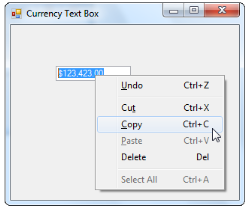
Overflow Indicator
You can display an indicator in the textbox when the currency value is displayed beyond its boundaries. You can also display a tooltip for the overflow indicator. The tooltip text is specified in OverflowIndicatorToolTipText. Set the ShowOverflowIndicator property to true to enable this feature. Set the ShowOverflowIndicatorToolTip property to true to display the tooltip text.
this.currencyTextBox1.OverflowIndicatorToolTipText = "Overflow";
this.currencyTextBox1.ShowOverflowIndicator = true;
this.currencyTextBox1.ShowOverflowIndicatorToolTip = true;Me.currencyTextBox1.OverflowIndicatorToolTipText = "Overflow"
Me.currencyTextBox1.ShowOverflowIndicator = True
Me.currencyTextBox1.ShowOverflowIndicatorToolTip = True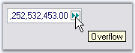
Globalization
The WinForms Currency TextBox class is globalization-aware and uses System.Globalization.CultureInfo for locale-specific information. You can set the control’s culture to any installed culture through its Culture property.
- Culture - Sets the culture used for formatting and parsing.
-
CurrentCultureRefresh - When
true, the control refreshes whenever the current culture changes. - SpecialCultureValue - Specifies how the control behaves for neutral cultures that do not define currency or number format information.

this.currencyTextBox1.Culture = new System.Globalization.CultureInfo("ar-SA");
this.currencyTextBox1.CurrentCultureRefresh = true;
this.currencyTextBox1.SpecialCultureValue = Syncfusion.Windows.Forms.Tools.SpecialCultureValues.None;Me.currencyTextBox1.Culture = New System.Globalization.CultureInfo("ar-SA")
Me.currencyTextBox1.CurrentCultureRefresh = True
Me.currencyTextBox1.SpecialCultureValue = Syncfusion.Windows.Forms.Tools.SpecialCultureValues.NoneUser Override for Culture
| WinForms Currency TextBox Property | Description |
|---|---|
| UseUserOverride | Specifies if the NumberFormatInfo used for formatting will use the User overrides for the culture. |
this.currencyTextBox1.UseUserOverride = false;
this.currencyTextBox1.Culture = new CultureInfo(CultureInfo.CurrentUICulture.LCID, this.currencyTextBox1.UseUserOverride);Me.currencyTextBox1.UseUserOverride = False
Me.currencyTextBox1.Culture = New CultureInfo(CultureInfo.CurrentUICulture.LCID, Me.currencyTextBox1.UseUserOverride)Culture name
The culture name can be displayed in different formats according to the specified culture value. Refer to the following table for details.
| CurrencyTextBox.Culture Property | Description |
|---|---|
| DisplayName | Gets the culture name in the format "<language full>(<country/region full>)" in the language of the localized version of the .NET Framework. |
| EnglishName | Gets the culture name in the format "<language full>(<country/region full>)" in English. |
| NativeName | Gets the culture name in the format "<language full>(<country/region full>)" in the language that the culture is set to display. |
| ThreeLetterWindowsLanguageName | Gets the three letter code for the language as specified in the Windows API. |
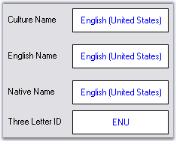
The following figure illustrates this when the culture is en-US.
this.label11.Text = this.currencyTextBox1.Culture.DisplayName;
this.label12.Text = this.currencyTextBox1.Culture.EnglishName;
this.label13.Text = this.currencyTextBox1.Culture.NativeName;
this.label14.Text = this.currencyTextBox1.Culture.ThreeLetterWindowsLanguageName;Me.label11.Text = Me.currencyTextBox1.Culture.DisplayName
Me.label12.Text = Me.currencyTextBox1.Culture.EnglishName
Me.label13.Text = Me.currencyTextBox1.Culture.NativeName
Me.label14.Text = Me.currencyTextBox1.Culture.ThreeLetterWindowsLanguageName