Getting Started with Windows Forms ComboBoxBase
18 Nov 201813 minutes to read
ComboBoxBase is a base control that hosts a separate ListControl (typically a ListBox) as its drop-down portion. This section explains how to get started with the WinForms ComboBoxBase control and its basic features.
Assembly Deployment
Refer to the Control Dependencies section for the list of assemblies and NuGet packages required to use the ComboBoxBase control.
Refer to NuGet Packages to learn how to install NuGet packages in a Windows Forms application.
To install the required NuGet package using the NuGet Package Manager Console, run the following command:
Install-Package Syncfusion.Shared.Base
Adding ComboBoxBase via Designer
-
Add the
Syncfusion.Shared.Baseassembly reference to the project. -
Drag the
ComboBoxBasecontrol from the Toolbox onto the Windows Form designer.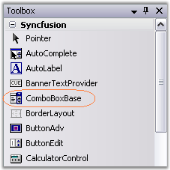
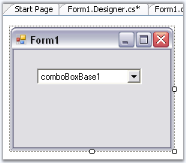
-
To provide data for the drop-down list, drag a
ListBoxcontrol (or anotherListControl-derived control) onto the form.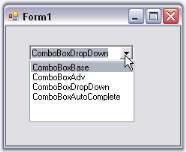
-
Select the
ComboBoxBasecontrol, and in the Properties window, set theListControlproperty to theListBoxcontrol that you added.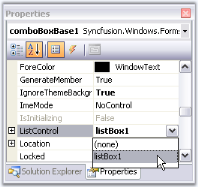
Adding ComboBoxBase via Code
To add the ComboBoxBase control programmatically, follow these steps:
-
Add the
Syncfusion.Shared.Baseassembly reference to the project and include the required namespace in the code.using Syncfusion.Windows.Forms.Tools;Imports Syncfusion.Windows.Forms.Tools -
Create instances of the
ComboBoxBaseandListBoxcontrols.private Syncfusion.Windows.Forms.Tools.ComboBoxBase comboBoxBase1; private System.Windows.Forms.ListBox listBox1; this.comboBoxBase1 = new Syncfusion.Windows.Forms.Tools.ComboBoxBase(); this.listBox1 = new ListBox();Private comboBoxBase1 As Syncfusion.Windows.Forms.Tools.ComboBoxBase Private listBox1 As System.Windows.Forms.ListBox Me.comboBoxBase1 = New Syncfusion.Windows.Forms.Tools.ComboBoxBase() Me.listBox1 = New ListBox() -
Assign the
ListBoxcontrol to theListControlproperty of theComboBoxBasecontrol and set the required size.this.comboBoxBase1.ListControl = this.listBox1; this.comboBoxBase1.Size = new Size(120, 20);Me.comboBoxBase1.ListControl = Me.listBox1 Me.comboBoxBase1.Size = New Size(120, 20) -
Specify the data source for the ListBox control.
// Sets the data source.
    ArrayList USStates = new ArrayList();
    USStates.Add(new USState("Washington", "WA"));
    USStates.Add(new USState("West Virginia", "WV"));
    USStates.Add(new USState("Wisconsin", "WI"));
    USStates.Add(new USState("Wyoming", "WY"));
    this.listBox1.DataSource = USStates;
' Sets the data source. Dim USStates As ArrayList = New ArrayList() USStates.Add(New USState("Washington", "WA")) USStates.Add(New USState("West Virginia", "WV")) USStates.Add(New USState("Wisconsin", "WI")) USStates.Add(New USState("Wyoming", "WY")) Me.listBox1.DataSource = USStates -
Add the
ComboBoxBaseandListBoxcontrols to the form.this.Controls.Add(this.listBox1); this.Controls.Add(this.comboBoxBase1);Me.Controls.Add(Me.listBox1) Me.Controls.Add(Me.comboBoxBase1)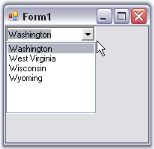
Complete Code Example
The following example combines all the preceding steps into a single runnable application.
using Syncfusion.Windows.Forms.Tools;
using System.Collections;
using System.Drawing;
public partial class Form1 : Form
{
private Syncfusion.Windows.Forms.Tools.ComboBoxBase comboBoxBase1;
private System.Windows.Forms.ListBox listBox1;
public Form1()
{
InitializeComponent();
this.comboBoxBase1 = new Syncfusion.Windows.Forms.Tools.ComboBoxBase();
this.listBox1 = new ListBox();
this.comboBoxBase1.Location = new Point(20, 20);
this.comboBoxBase1.Size = new Size(120, 20);
this.listBox1.DisplayMember = "LongName";
this.listBox1.ValueMember = "Abbreviation";
// Sets the data source.
ArrayList USStates = new ArrayList();
USStates.Add(new USState("Washington", "WA"));
USStates.Add(new USState("West Virginia", "WV"));
USStates.Add(new USState("Wisconsin", "WI"));
USStates.Add(new USState("Wyoming", "WY"));
this.listBox1.DataSource = USStates;
this.comboBoxBase1.ListControl = this.listBox1;
this.Controls.Add(this.listBox1);
this.Controls.Add(this.comboBoxBase1);
}
}
// USState class
public class USState
{
public string LongName { get; set; }
public string Abbreviation { get; set; }
public USState(string longName, string abbreviation)
{
this.LongName = longName;
this.Abbreviation = abbreviation;
}
}Imports Syncfusion.Windows.Forms.Tools
Imports System.Collections
Imports System.Drawing
Public Partial Class Form1
Inherits System.Windows.Forms.Form
Private comboBoxBase1 As Syncfusion.Windows.Forms.Tools.ComboBoxBase
Private listBox1 As System.Windows.Forms.ListBox
Public Sub New()
InitializeComponent()
Me.comboBoxBase1 = New Syncfusion.Windows.Forms.Tools.ComboBoxBase()
Me.listBox1 = New ListBox()
Me.comboBoxBase1.Location = New Point(20, 20)
Me.comboBoxBase1.Size = New Size(120, 20)
Me.listBox1.DisplayMember = "LongName"
Me.listBox1.ValueMember = "Abbreviation"
' Sets the data source.
    Dim USStates As ArrayList = New ArrayList()
    USStates.Add(New USState("Washington", "WA"))
    USStates.Add(New USState("West Virginia", "WV"))
    USStates.Add(New USState("Wisconsin", "WI"))
    USStates.Add(New USState("Wyoming", "WY"))
    Me.listBox1.DataSource = USStates
Me.comboBoxBase1.ListControl = Me.listBox1
Me.Controls.Add(Me.listBox1)
    Me.Controls.Add(Me.comboBoxBase1)
End Sub
End Class
' USState class
Public Class USState
Public Property LongName As String
Public Property Abbreviation As String
Public Sub New(ByVal longName As String, ByVal abbreviation As String)
Me.LongName = longName
Me.Abbreviation = abbreviation
End Sub
End ClassFor more information, refer to the Creating ListControl-Derived Controls topic.