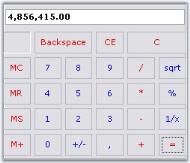
How to Customize Display Area in WinForms Calculator
18 Nov 20181 minute to read
The WinForms Calculator control by default does not allow the use of NumberGroupSeparator like in DoubleTextBox.

To achieve this, we need to derive from the WinForms Calculator control and override the CreateCalculatorDisplayBox() method.
private CalculatorAdv calculatorControl1;
this.calculatorControl1 = new CalculatorAdv();

public class CalculatorAdv : Syncfusion.Windows.Forms.Tools.CalculatorControl
{
    public CalculatorAdv()
    {
    }

    protected override void CreateCalculatorDisplayBox()
    {
        Syncfusion.Windows.Forms.Tools.DoubleTextBox dtb = new Syncfusion.Windows.Forms.Tools.DoubleTextBox();
        dtb.NumberGroupSeparator = ",";
        this.textCalculatorBox = dtb; //Changing the TextBox to DoubleTextBox
    }
}
Private calculatorControl1 As CalculatorAdv
Me.calculatorControl1 = New CalculatorAdv()
Public Class CalculatorAdv
Inherits Syncfusion.Windows.Forms.Tools.CalculatorControl
Public Sub New()
End Sub
Protected Overloads Overrides Sub CreateCalculatorDisplayBox()
Dim dtb As New Syncfusion.Windows.Forms.Tools.DoubleTextBox()
dtb.NumberGroupSeparator = ","
Me.textCalculatorBox = dtb
'Changing the TextBox to DoubleTextBox
End Sub
End Class